
Read your credit usage report
See where your Qoren credits went. The Usage statement lists credits in and out by category for any date range, with grants, top-ups, expiries and adjustments.
On this page
The Usage statement shows every movement of your credit balance over a date range you choose: what came in, what went out, and on what. Use it to check a bill, spot a costly month, or see what a renewal did to your balance.
Open the statement#
- Go to Settings and open Usage.
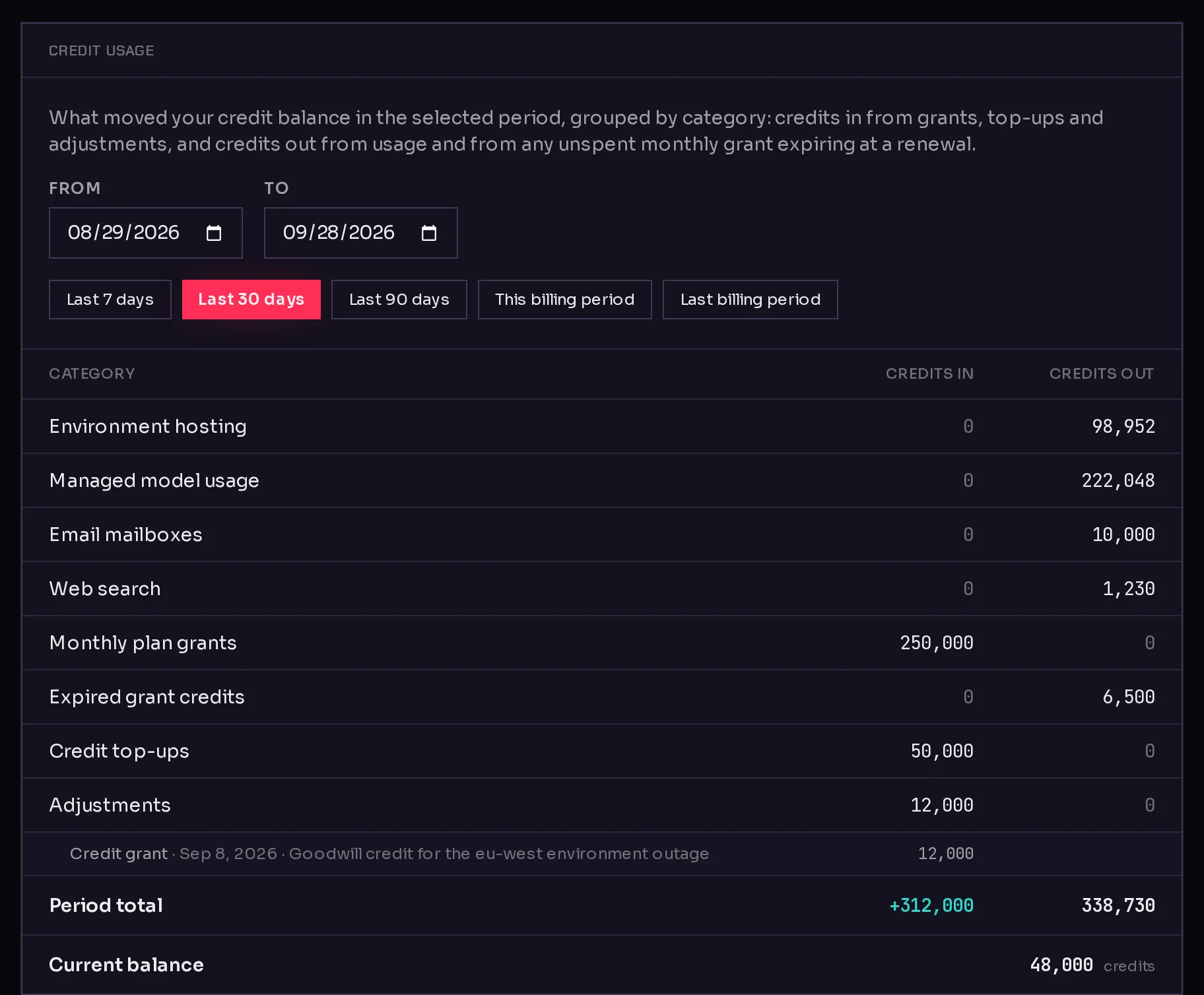
- Pick a range with the presets (1): Last 7 days, Last 30 days, Last 90 days, This billing period or Last billing period. Or set your own dates in From and To.
 123
123The statement opens on the last 30 days. This billing period runs from the start of your current period to today, which is the view that matches your monthly grant.
Read the categories#
Each row is one category, with Credits in and Credits out (2). Categories with no movement in the range are left out.
Credits out, what spent your balance:
- Environment hosting: the hourly charge for your running environments.
- Managed model usage: model calls made with Qoren's managed key.
- Email mailboxes: the monthly charge for agent inboxes.
- Web search: your agents' web searches.
- Expired grant credits: what was left of a monthly grant when the period renewed. This is not usage; it is the old grant lapsing before the new one arrives.
Credits in, what added to it:
- Monthly plan grants: the credits your plan adds each period.
- Credit top-ups: credits you bought, by hand or with automatic top-up.
- Adjustments: credits the Qoren team added or removed, for example a goodwill credit or a correction. Each one is listed under the row with its date and the reason.
At the bottom, Period total adds up both columns for the range, and Current balance (3) shows what you hold right now.
See one agent's spend#
The statement covers your whole account. To see what a single agent spent, open the agent and choose its Usage tab. See agent usage. Agencies can also split spend by client; see cost per client.
Keep spend in check#
The statement tells you what happened. To decide what happens next, set up alerts, automatic top-ups or a monthly budget under Billing controls. See spend controls.
Frequently asked questions#
Why do I see credits going out that I did not spend?
Look for Expired grant credits. When your billing period renews, the unused part of the old grant expires and a fresh grant is added. Your topped-up credits are never expired.
Why does my total not match my invoice?
Invoices are for your plan and your top-ups, in money. This statement is in credits and shows how they were used. Download invoices from Manage billing on the Billing tab. See manage your subscription.
Can I still see my usage after my plan ends?
Yes. The Usage tab stays available as long as your account has had a subscription, so you can read past periods after cancelling.
How far back can I look?
Pick any From date with the date field. For long ranges, the statement may tell you the totals are a minimum; narrow the range for exact figures.