
Create an environment
Create a new Qoren environment for your agents. Name it, pick a size by how many agents it should hold, and see what happens while it is being set up.
On this page
Create an environment when you need a home for your first agent, when your current environments are full, or when you want to keep a group of agents apart, such as one per client. It takes a name, a size and one click.
Before you start#
- You need a plan or an active free trial. Without one, the form says "Pick a plan first" and offers See plans instead. See plans and the free trial.
- You must be below your plan's limit on environments. At the limit, the New environment button is not shown.
Create it from the Environments page#
- In the sidebar, open My Company and click Environments.
- Click New environment in the top right.
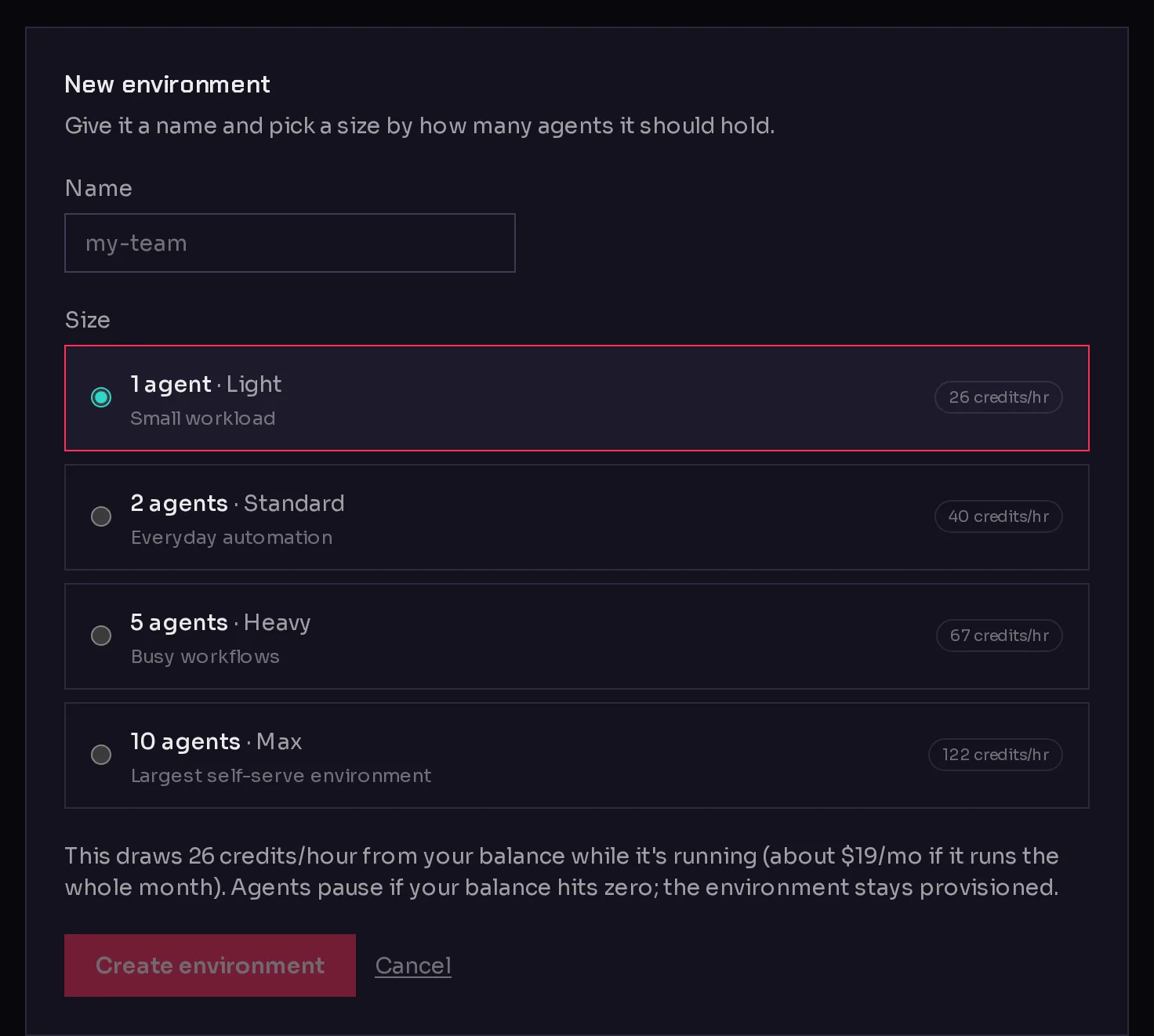
- Type a Name (1). Use something you will recognize, such as
sales-team. Spaces turn into dashes as you type, and each environment needs a name none of your other environments uses.
 123
123- If you use agency clients, pick the Client this environment works for, or leave it on No client. The menu only appears once you have added a client.
- Under Size (2), pick how many agents it should hold. The smallest size your plan allows is selected for you. Environment sizes and agent capacity helps you choose.
- Read the line under the sizes: it says how many credits per hour the size draws while running, and what that comes to if it runs the whole month.
- Click Create environment (3).
What happens next#
The form turns into Setting up your environment with a progress list of each step. This usually takes a minute or two. You can leave the page: the environment keeps setting up and appears on the Environments page with the status Setting up.
When it is ready, the form says Your environment is ready and offers Add an agent here, which opens the create an agent flow. You may also see "Dependencies are still installing. You can already add and configure agents; a deploy waits for the install to finish." You can go ahead and create your agent right away.
The environment starts drawing its hourly credit rate once it is up. It is created in your company's default region, which the account owner sets under Details, in the Environment region card.
Create one while creating an agent#
You do not have to visit the Environments page first. When you create an agent and have no environment it can use, the flow shows Set up an environment first.
- Click Set up an environment.
- On the New environment page, type a Name and pick a Size. The box at the top says what the chosen size draws per hour.
- Click Create environment.
You go straight back to your agent. A note says Your environment is being set up: keep filling in your agent, and it launches as soon as the environment is ready.
If you use agency clients, a client's page has its own New environment button, which opens the same page with that client already selected.
If your size is not offered in your region#
Now and then a size is not available in your region. Instead of failing, Qoren explains and offers a way forward:
- Yes, use followed by a region: creates the environment in the closest region that has the size.
- A button such as Use the 2-agent size here: stays in your region on a size it does have.
- Cancel: changes nothing, so you can pick again.
Frequently asked questions#
How long does a new environment take?
Usually a minute or two. Some dependencies can keep installing after that, but you can already add agents; their setup waits for the install.
Does an empty environment cost credits?
Yes. An environment draws its hourly rate while it runs, even before any agent lives on it.
Can I choose where my environment runs?
Not per environment. New environments go to your company's default region. The account owner can change it under Details; see company details.
Can I change the size later?
You can make it bigger at any time within your plan. See resize an environment. It cannot be made smaller.