
Delete your Qoren account
Delete your Qoren account with a 30-day grace period you can cancel, or permanently right away. What gets erased, and what happens to your plan and agents.
On this page
You can delete your Qoren account yourself from Settings. There are two ways: a scheduled deletion with 30 days to change your mind, or an immediate one that cannot be undone. If you only want to stop paying, cancel your plan instead; see manage your subscription.
Before you start#
- Export anything you want to keep. Download your account data first, see export your data, and save your agents' files from each agent's Workspace tab. Neither is recoverable after deletion.
- If you own an organization with teammates, every other member who holds a seat must delete their own account first. Until then, deletion is refused and tells you how many teammates are still in the way.
Delete your account with a 30-day grace period#
- Open Settings and choose Data & privacy.
- Under Delete account, click Delete account.
- Type
DELETEin the box (1) and click Destroy (2).
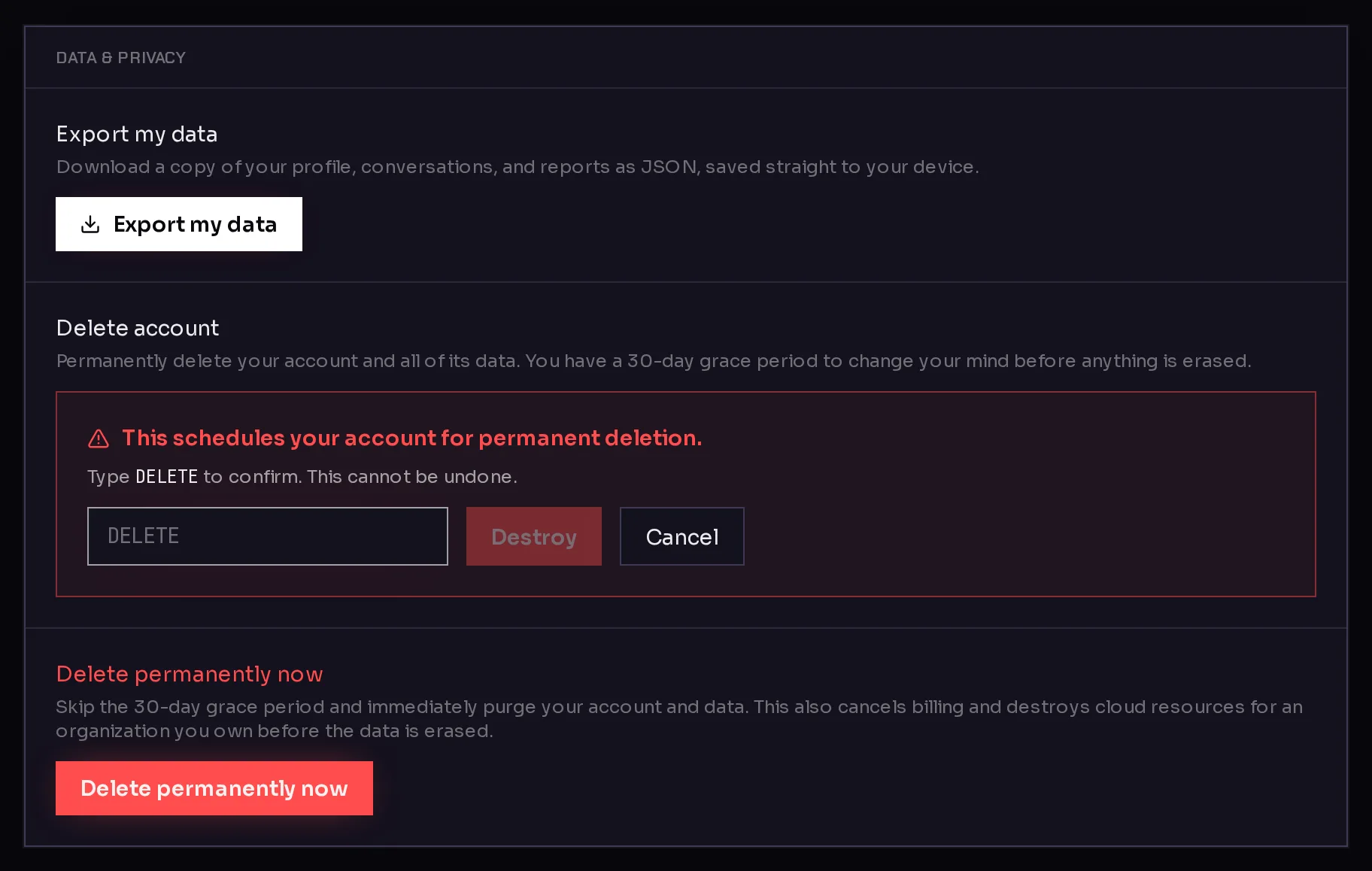 123
123Your account is now scheduled for deletion. You get an email confirming the date, and the card shows Your account is scheduled for deletion on that date.
During the 30 days:
- You can still sign in and change your mind. In Data & privacy, click Cancel deletion. You get an email confirming it.
- If you own the organization, your plan is set to cancel at the end of the current billing period. Cancelling the deletion undoes this, as long as the plan has not already ended.
When the 30 days are over, your account and all of its data are permanently erased.
Delete your account immediately#
Use this when you want everything gone now. It cannot be cancelled.
- Open Settings and choose Data & privacy.
- Under Delete permanently now, click Delete permanently now (3).
- Type
DELETE PERMANENTLYand click Destroy.
If you own the organization, Qoren first cancels its billing and destroys its cloud resources, your environments and the agents on them, and then erases the data. When it is done, you are taken to the sign-in page.
You can also do this during a scheduled deletion's grace period: the same Delete permanently now option stays on the card.
What is deleted#
When the deletion runs, Qoren erases:
- your profile, sign-in methods and sessions,
- your chats with agents and your Quick Start sessions,
- your CLI access tokens,
- if you own the organization: the organization itself, its credit balance and history, its subscriptions and agent mailboxes, and the passwords and keys saved in its Vault.
Teammates who belonged to your organization keep their own accounts; they are simply no longer part of it.
Frequently asked questions#
Can I get my account back after 30 days?
No. Once the grace period ends, the account and its data are erased for good. Cancel before the date shown in Data & privacy if you want to keep it.
Does deleting my account cancel my subscription?
Yes, if you own the organization. A scheduled deletion sets the plan to cancel at the end of the current billing period. Immediate deletion cancels billing straight away.
What happens to my environments?
Immediate deletion destroys them before anything else is erased. A scheduled deletion does not remove them when you request it. If you want them gone, remove them yourself before the deletion date, or use Delete permanently now.
Why does it say teammates still hold a seat?
An owner cannot delete an organization out from under its members. Each teammate with a seat has to delete their own account first. Once they have scheduled their deletion, they no longer block yours.
Is deleting my account the same as cancelling my plan?
No. Cancelling stops billing and keeps your account. See manage your subscription. To remove single agents, see remove or restore an agent.