
Report a bug or get help
Send a bug report to the Qoren team from the console, what to put in it so it gets fixed fast, what is attached for you, and other ways to reach us.
On this page
Found something broken or confusing? The quickest way to tell us is the Report a bug button in the console. Your report goes straight to the people who build Qoren, with the technical details attached for you.
Send a report#
- At the foot of the sidebar, click Report a bug. On a phone, open the menu first.
- Under Title (1), sum up the problem in a few words.
- Under Description (2), say what you did, what you expected, and what happened instead.
- Click Send report (3).
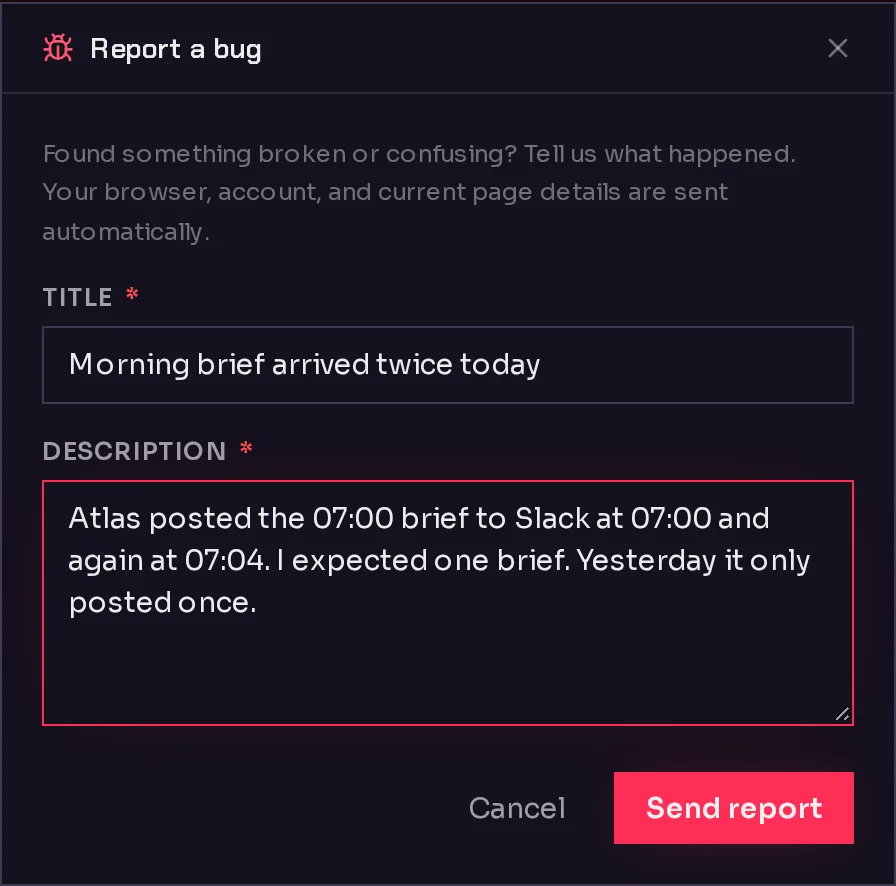 123
123When it is sent, the form says Thanks, your report was sent. Click Done to close it. Both fields are required; the button stays greyed out until you fill them in.
What to include#
A good report lets us reproduce the problem without writing back to you:
- Which agent or page. The agent's name, or the page you were on.
- What you did. The steps, in order, such as "opened Atlas, sent it a message on the Chat tab".
- What you expected, and what happened instead, including any error message word for word.
- When it happened, if it was not just now. It helps us find it in the logs.
- Whether it happens again when you retry.
Never paste passwords, API keys or other secrets into a report. If a key is involved, give its name, not its value.
What is attached for you#
You do not need to describe your setup. Each report automatically includes:
- Your browser: its version, your screen and window size, language and timezone.
- Your account: who you are, your organization and your role in it.
- The page: the address you were on when you opened the form.
- Your plan: which plan you are on and its status.
Other ways to get help#
- These docs. Click Help & docs in the sidebar or in your avatar menu. For an agent that has gone quiet, start with My agent is not responding. Common questions are answered in the FAQ.
- Email. Write to hello@qoren.sh. It is read by the people who build the product. Use it for anything that is not a bug, such as questions about billing or your account, or if you cannot sign in to send a report.
Frequently asked questions#
Will I hear back about my report?
The report goes to the Qoren team with your email address attached, so we can reach you if we need more detail. The console does not send you updates on a report's progress.
Can I attach a screenshot?
Not in the form. Describe what you see, and copy any error message word for word. If a screenshot really helps, email it to hello@qoren.sh and mention your report's title.
Is the information attached to my report private?
It goes only to the Qoren team, to help us fix the problem. See the privacy policy for how we handle your data.