
See what one agent costs on its Usage tab
The Usage tab shows the credits one agent was charged, on the managed key or your own, and what it did: sessions, tokens, sources, models and when it works.
On this page
The Usage tab shows what one agent cost and what it did for that money, for any period from a day to 90 days. It keeps two things apart: the credits your account was actually charged for this agent, which are exact, and the agent's own record of its sessions, which shows the work behind them, including work on your own model key that costs no credits. For your whole account, see usage reports.
Open the agent and click Usage in its tab rail. If you do not see a Usage tab, it is not turned on for your account yet.
Set the period and key#
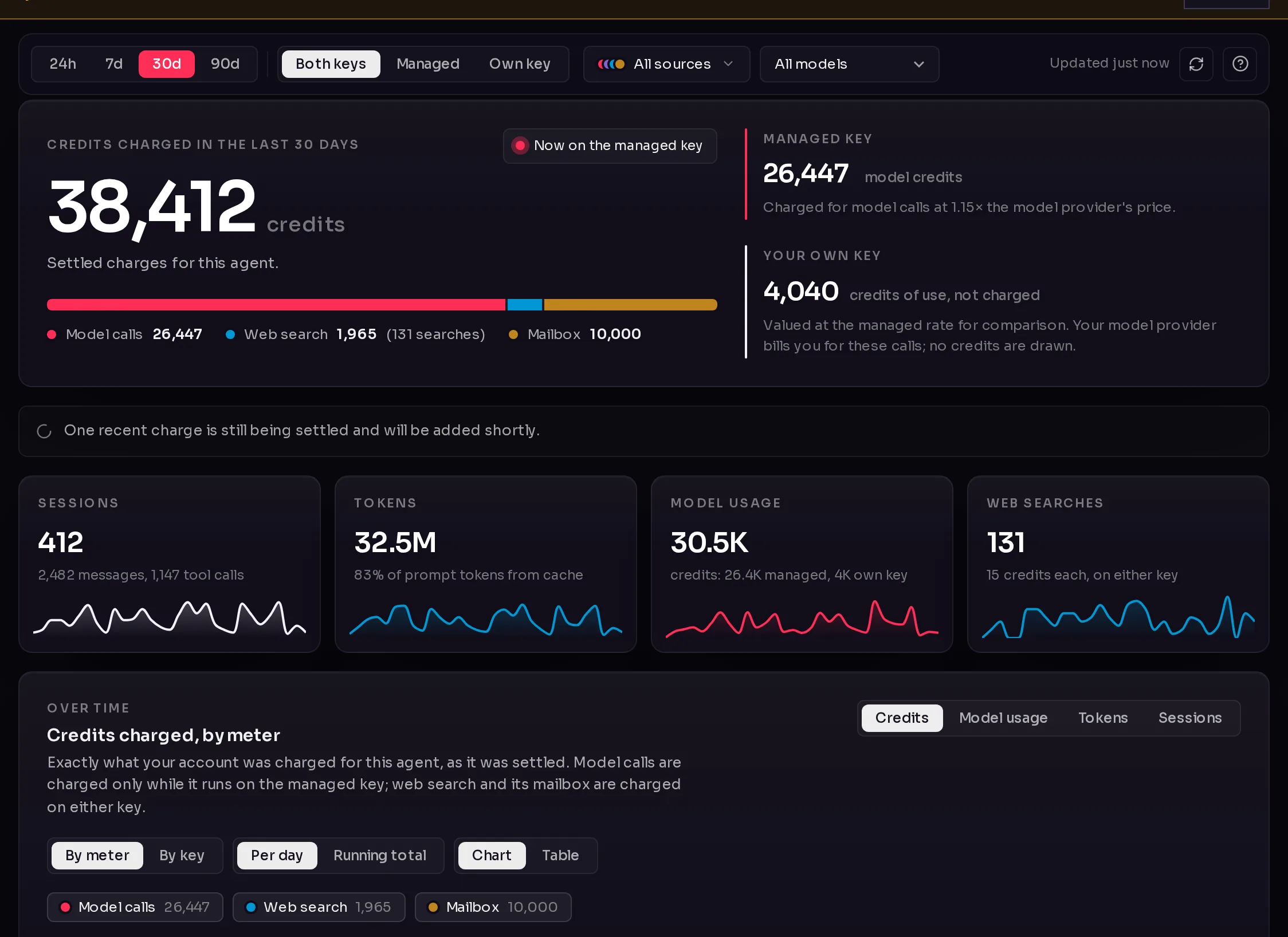
The row of filters at the top (1) scopes everything below it:
- Period: 24h, 7d, 30d or 90d.
- Key: Both keys, Managed (Qoren's managed model key) or Own key (a key you connected). See bring your own key.
- When the agent reports session detail, a source picker and a model menu let you narrow to one source (such as Console chat, Scheduled tasks or Slack) or one model. Credits are settled per agent, not per source or model, so these two filters apply to the session figures only.
Clear filters resets them. The row also says when the numbers were last updated, with a refresh button, and the ? button (2) opens Where the numbers come from, explained below.
 123
123Read the credits charged#
The large figure (3), Credits charged in the last 30 days (or your period), is exactly what your account was charged for this agent, as it was settled. A pill beside it says whether the agent is Now on the managed key or Now on your own key.
Under it, a bar splits the charge into three meters:
- Model calls: the model's work, charged only while the agent runs on the managed key.
- Web search: each search or page read, charged on either key.
- Mailbox: the monthly charge for the agent's email inbox, if it has one, on the day it renews.
Two cards compare the keys side by side:
- Managed key: the model credits charged, at a markup on the model provider's price that the card states.
- Your own key: what the agent's calls on your key would have cost in credits at the managed rate, marked credits of use, not charged. Your provider bills you for those calls directly; no credits are drawn.
A note appears when a recent charge is still being settled; it is added shortly. Environment hosting is not part of this total: it is billed per environment, shared by the agents on it.
Explore what it did#
Below the credits, the tab shows the agent's sessions. A session is one conversation or task run: a chat, a scheduled task, or a message from a connected channel.
- Four tiles: Sessions, Tokens, Model usage and Web searches, each with a small trend line.
- Over time: a chart you can switch between Credits, Model usage, Tokens and Sessions, split By meter, By key, By source or By model, as Per day (or per hour) or a Running total, and shown as a Chart or a Table.
- Where it went: the same split as shares of the whole period.
- Weekly rhythm: when the agent works, by weekday and hour, in your time zone.
- What the tokens were: fresh input, tokens read from and written to the provider's cache, output and reasoning. A high cache share keeps long conversations affordable.
- Breakdown: the sessions by source or by model, with tokens and share of usage.
- Recent sessions: the latest sessions in the period. Click a column to sort it.
Session credits are estimates at the managed rate, from the cost the provider reported. The settled charge at the top is the exact figure.
Where the numbers come from#
Click the ? button in the filter row to open Where the numbers come from. It explains, for this agent:
- Managed key: model calls are charged in credits at the stated multiple of the model provider's price, settled as the platform meters them, so the headline can briefly trail the latest sessions.
- Your own key: calls on a key you connected are billed by your provider and draw no model credits. They still show here, valued at the managed rate so both keys compare on one scale, and each session is labelled by the key your account was on when it started.
- Web search: what each search or page read costs in credits, on either key, since the search provider is Qoren's in both cases.
- Mailbox: the monthly charge lands on the day the mailbox renews and counts toward this agent.
- Environment hosting: how many credits the agent's environment used in the period and how many agents share it. This is context and not part of the agent's total.
- Sessions and estimates: where tokens, sources and models come from, and that session credits are estimates while the settled charge is exact.
Press Escape or click outside the dialog to close it.
Frequently asked questions#
Why is the credits figure lower than the model usage tile?
Model usage values every session at the managed rate, on either key. Only managed-key calls are charged, so time on your own key adds to model usage but not to the credits charged.
Why do I see no sessions, only credits?
Either the agent runs on OpenClaw or Codex, which do not report session detail yet, or it has not had a session in the period. A new agent shows its sessions within a minute of its first chat.
Where do I see the cost of all my agents together?
In Settings, Usage. See usage reports. If you run agents for clients, cost per client adds them up per client.
Does the Usage tab show money?
No. Everything is in credits. To see what credits cost, see how credits work and the pricing page.