
Create and revoke CLI access tokens
Create a personal access token for the Qoren CLI or SDK, approve a qoren login in your browser, and revoke tokens from computers or CI jobs you no longer trust.
On this page
An access token is how the Qoren CLI and SDK prove who you are. Most people never create one by hand: qoren login makes its own through your browser. You need this page when there is no browser to sign in with, such as a CI job or a server, and when you want to cut off a token you no longer trust.
A token acts as you. It can do anything you can do in the console, within your organization and your plan's limits, and nothing more. It cannot change your password or your billing details.
Before you start#
- Your organization needs a plan that includes API access: Ultimate, Business or Enterprise. Tokens, the CLI and the SDK are API access, so on Starter or Pro every request made with a token is refused. The web console works on every plan. Compare plans on the pricing page.
Approve a sign-in from the CLI#
When you run qoren login, your browser opens a page titled Connect the Qoren CLI. If you are signed out, you sign in first and land back on it.
- Check Signing in as: it should be your account.
- Check Token name: this is the name the token will have in your settings (
cliunless you ranqoren login --name). - Check Returning to: it must be an address on your own computer. The page refuses any other address and says "This sign-in request could not be verified."
- Click Authorize. To back out, click Cancel; nothing is granted until you press Authorize.
If your plan does not include API access, the page says so in place of the Authorize button, with Upgrade your plan and Compare plans. Nothing is authorized. Upgrade, then run qoren login again.
The browser hands a one-time code back to the waiting CLI, which exchanges it for the token and stores it. The code is only good for 90 seconds and only once, and the CLI must also prove it started the request, so a code seen by anything else is useless. If you did not just run qoren login yourself, close the page.
Create a token for CI or a server#
- In the sidebar, click Settings, then the CLI tokens tab. If your plan does not include API access, the tab explains that in place of the form and links to Upgrade your plan; your existing tokens are still listed so you can revoke them.
- Type a name in Token name (1) so you can recognize it later, such as
ciorbuild-server. Leave it blank and it is calledcli. - Click Create token (2).
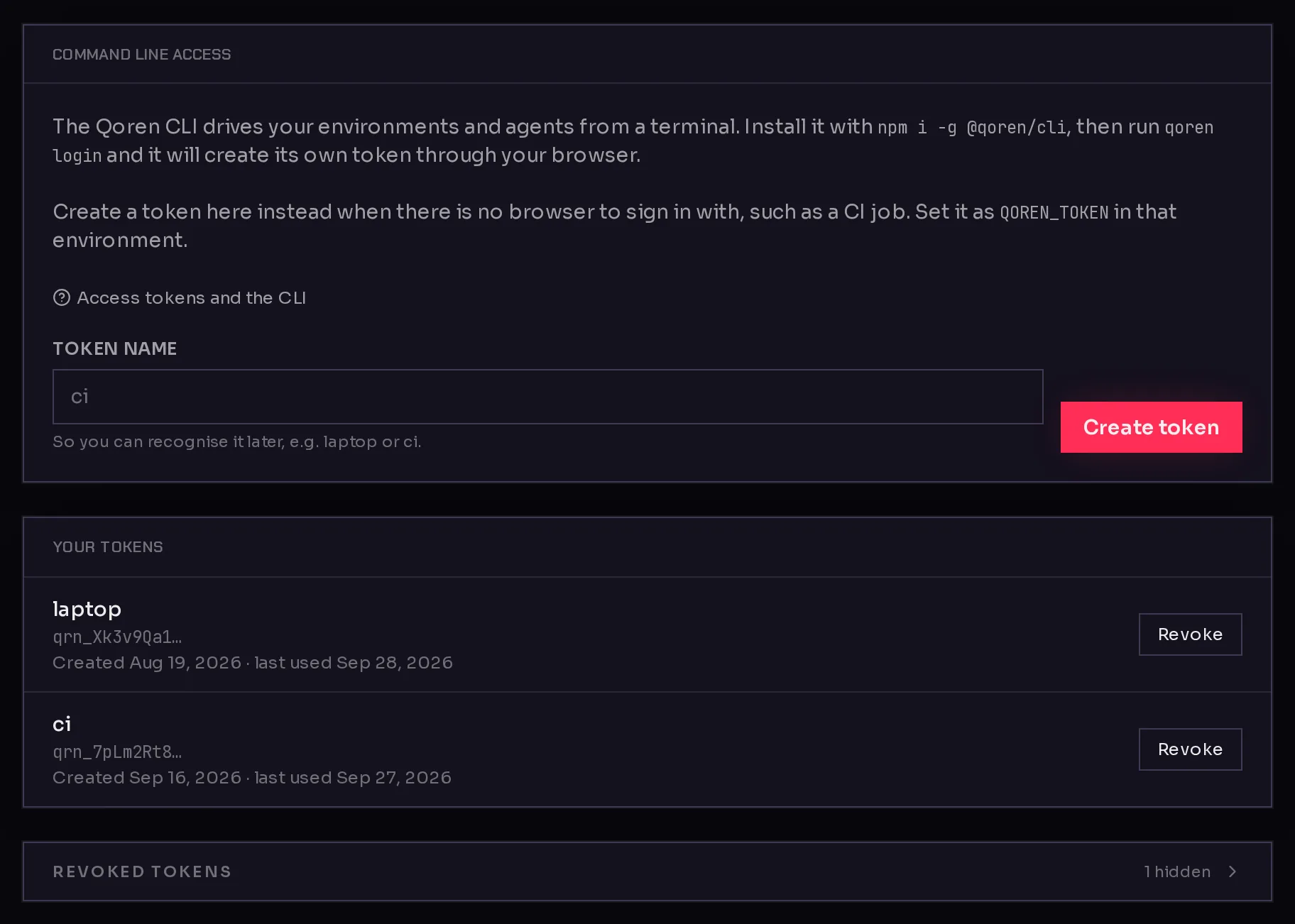 123
123- Copy the token from the box that appears ("Copy this token now. It will not be shown again.") with Copy.
- Store it as a secret in your CI system or on the server, and expose it as the
QOREN_TOKENenvironment variable.
export QOREN_TOKEN=qrn_...
qoren whoami
QOREN_TOKEN wins over any stored login, so the job never picks up someone's personal profile. For more on running the CLI in a pipeline, see the Qoren command line. The same token works with the Qoren SDK.
Revoke a token#
- Open Settings, CLI tokens.
- Under Your tokens, find the token by its name and the first characters shown under it.
- Click Revoke (3), then click Revoke again to confirm. The row warns: "Revoke this token? Anything using it stops working within about 30 seconds."
Anything still using the token is refused within about 30 seconds, and the CLI on that computer exits with code 3. Revoking cannot be undone, and it does not touch your other tokens. Revoked tokens move under Revoked tokens, where you can still see when each one was created and revoked.
Signing out with qoren logout only deletes the copy on that computer. To cut off a laptop you lost, revoke its token here.
Rotate a token#
There is no rotate button, because a token has no expiry to renew. To replace one:
- Create a new token with a clear name, such as
ci-2026-10. - Put the new value into your CI secret or server and check it with
qoren whoami. - Revoke the old token.
Keep tokens safe#
- Every Qoren token starts with
qrn_. Treat it like a password: never commit it or paste it into a shared chat. - Use one token per place (laptop, CI, a server). Then revoking one never breaks the others.
- Each row shows when the token was created and when it was last used, so you can spot tokens nobody uses any more. The last-used date can lag by a few minutes.
- A token keeps working until you revoke it. It also stops working if your account is deactivated.
- You can create up to 10 tokens an hour.
Frequently asked questions#
Do tokens expire?
No. A token works until you revoke it, or until your account can no longer sign in. Revoking is the control, so revoke tokens you no longer need.
Can a token do more than my account can?
No. The CLI, the SDK and the console all go through the same gate, which applies your organization's plan limits to every request.
Which plans include API access?
Ultimate, Business and Enterprise, including a free trial of one of them. On Starter, Pro, or with no plan, every request made with a token is refused with a 403 whose code is api_access_required, and the CLI exits with code 4. The web console keeps working on every plan.
What happens to my tokens if I change plan?
Nothing is deleted. After a downgrade to a plan without API access, your tokens are refused within about 30 seconds. After an upgrade, they work again within about 30 seconds. A cancelled plan keeps API access while it still runs on its remaining credits, and loses it when the plan has fully ended.
Can I see a token again after creating it?
No. Qoren only keeps a fingerprint of it. The list shows the first few characters so you can tell tokens apart, and that is not enough to use one. Create a new token and revoke the lost one.
Why is there a token called cli that I did not create?
qoren login creates a token through your browser and names it cli unless you pass --name. It is listed here like any other, so you can revoke it the same way.