
AI automation agency proposal template and generator
A free proposal template and generator for AI automation agencies and freelancers. Lay out the agents and what each one does, price them from your own costs, add ways to pay and a timeline, and print a client-ready proposal or save it as a PDF. No signup: it saves in your browser as you type.
How to write an AI automation proposal with the generator
Six steps from a blank page to a proposal you can send. Each one fills a part of the document, in the order the client reads it.
Step 1
Add your company
Your company name, logo, colour and contact details go on the cover and at the foot of the document.
Step 2
Say where the client stands today
Describe the problem in the client's terms and add the figures that show it, such as how long first replies take. This becomes Where you are today.
Step 3
Add the agents
For each agent, say what it does, how it works step by step and which tools it connects to, and how many the client needs.
Step 4
Price it from your costs
Enter what each agent costs you a month and the margin you want. The generator suggests each price, and you can add a setup fee, discounts, optional add-ons and several ways to pay.
Step 5
Set the timeline
Break the work into phases, with what each one delivers and how long it takes, so the client sees when the agents go live.
Step 6
Print it or save it as a PDF
Choose the paper size, rename or reorder any section, and print the proposal or save it as a PDF to send.
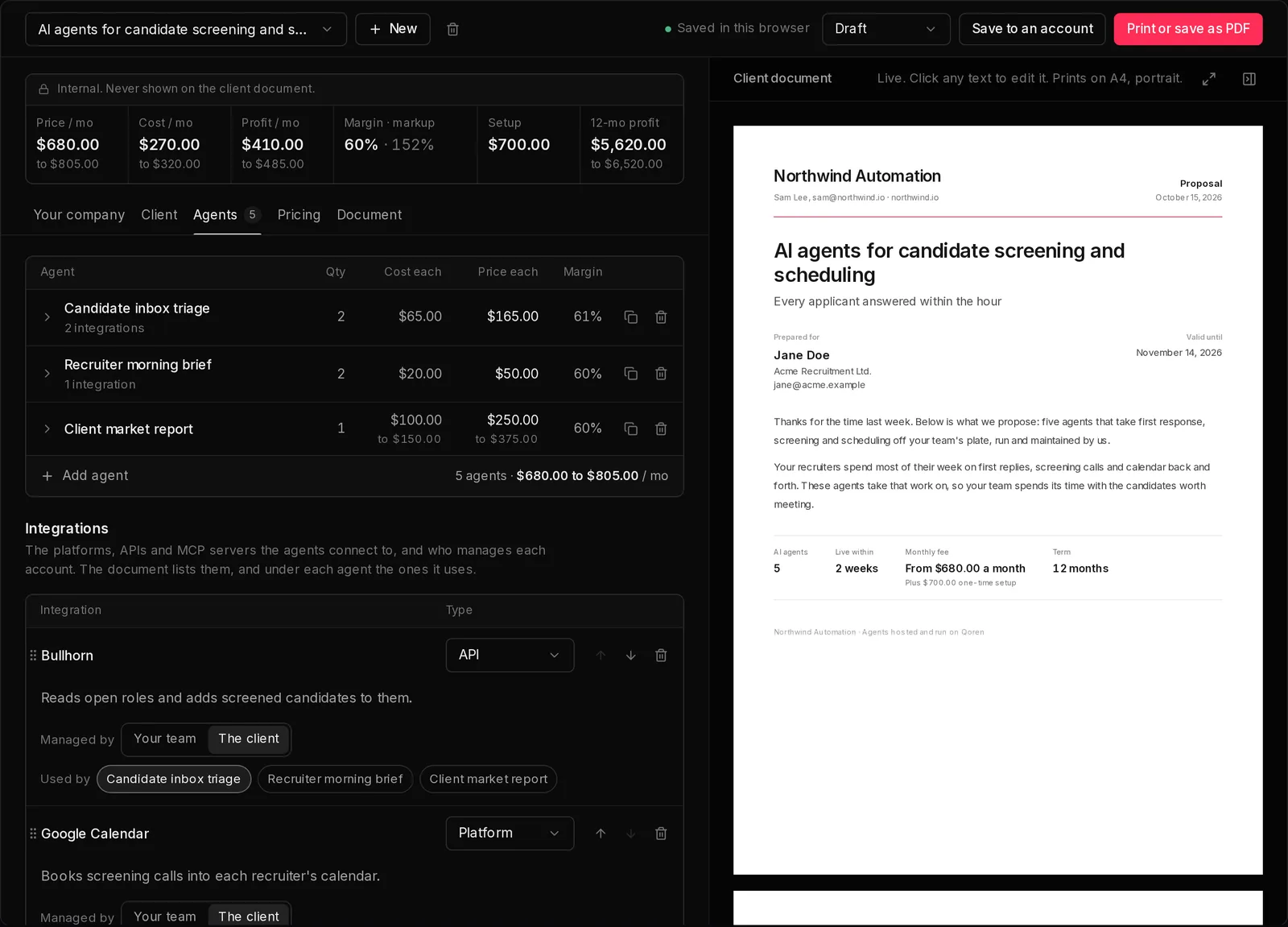
An example AI automation proposal
This is the example the generator opens with: a proposal from an automation agency, Northwind Automation, to Acme Recruitment Ltd., a recruitment firm. Here is what each part of it says.
Cover
AI agents for candidate screening and scheduling. Every applicant answered within the hour. Thanks for the time last week. Below is what we propose: five agents that take first response, screening and scheduling off your team's plate, run and maintained by us. At a glance: 5 AI agents, live within 2 weeks, $680.00 to $805.00 a month plus $700.00 one-time setup, over 12 months.
Where you are today
Applications reach the careers inbox faster than the team can read them. First replies wait two days on average, and good candidates accept other offers while they wait. Screening calls and calendar back and forth take most of each recruiter's week, which leaves little time for the candidates who are a real fit.
What we'll set up
We set up five agents, connect them to Bullhorn, the careers inbox and your recruiters' calendars, and run and maintain them for you.
- Candidate inbox triage (2): Reads every application that lands in the jobs inbox, sorts it by role and flags the strongest ones.
- Recruiter morning brief (2): Sends each recruiter a short summary of new applicants and interviews due that day.
- Client market report: Researches hiring trends in each client's sector and writes a report every Monday.
What changes for you
- Every applicant hears back the same day. The inbox agents reply to each application as it arrives, so good candidates hear from you before they hear from anyone else.
- Recruiters spend their time on screened candidates. Each one starts the day knowing who is new and who needs a decision, instead of working through the inbox.
- First interviews are booked without back and forth. Strong candidates pick a time from the recruiter's calendar in the same reply.
How we'll deliver
Two weeks to go live, then a month of tuning on real applicants.
- Discovery and access: We agree the screening criteria and connect to Bullhorn and the careers inbox.
- Build and go live: The agents answer test applicants, then real ones.
- Tune on live applicants: We review every week and adjust the screening with your recruiters.
- Review and expand: A review of the first quarter, and what to hand the agents next.
Investment
The monthly fee is $680.00 to $805.00 a month, depending on how much AI model usage the agents turn out to need, plus a $700.00 setup fee. Ways to pay: Setup, then monthly, Setup, then 3 months upfront, Full upfront. Optional add-ons: Second office market report, Candidate history import, Careers page assistant.
Terms and next steps
Billed monthly in advance. Either side can end the engagement with 30 days' notice.
- Accept this proposal.
- We start setting up your agents and ask for the access they need.
- Your agents go live, and the monthly fee starts.
What to include in an AI automation proposal
A proposal for AI automation work answers the client's questions in the order they ask them: what is wrong today, what you will set up, what changes for them, how and when you deliver it, what it costs, and what happens next. The template lays it out that way, and you can rename any heading, reorder the sections, start a new page wherever you like and add pages of your own.
- A cover with the price at a glance: the agents, how soon they go live, the monthly fee and the term.
- Where the client stands today, with the figures and screenshots that show it.
- Each agent, with what it does, how it works step by step and the tools it connects to.
- What changes for the client, and how you will deliver it, phase by phase.
- Monthly and setup prices, discounts, optional add-ons and several ways to pay.
- Terms, and the next steps numbered in order.
Priced from your own costs
Enter what each agent costs you a month, what the model provider charges and anything else such as hosting, tools or your team's time, then set the margin you want. The generator suggests each price, and a strip above the editor shows your price, cost, profit and margin as you work. None of it prints on the client's document.
Your work stays in your browser
There is no account to create. Proposals are saved in this browser as you type, and nothing you write is sent to us. Keep as many as you like, switch between them, and print any of them when it is ready to send. To send one as a link your client accepts and pays on, save it to a Qoren account, and your proposals come with you.
Frequently asked questions
What should an AI automation proposal include?
Where the client stands today, the agents you will set up and what each one does, what changes for the client, how and when you will deliver it, the investment with the ways to pay, and the next steps. A cover with the price at a glance comes first, so the client sees the shape of the deal before the detail.
Is this a proposal template or a generator?
Both. It opens on a blank proposal laid out like a template, or on a filled-in example, and works out the prices from the costs you enter, so the totals, discounts and ways to pay stay right as you change the agents.
How do I price an AI automation proposal?
Start from what each agent costs you a month and the margin you want. The usual shape is a one-time setup fee plus a monthly retainer, and the generator suggests both from your costs. For a first estimate before you write the proposal, the free agency pricing calculator works it out on one screen.
Is the proposal branded with Qoren?
Only if you want it to be. The document carries your company name, logo and colour, and a short line saying the agents run on Qoren that you can switch off under Your company.
Where are my proposals saved?
In this browser, as you type. Nothing you write is sent to us, so a proposal is only on the device and browser you made it in, and clearing the browser's data for this site deletes it.
Can I move my proposals into a Qoren account?
Yes. Choose Save to an account in the generator and sign up or sign in, and your proposals list offers to add the ones saved in this browser, images included. In the account, each agent is costed at Qoren's rates, and you can send the proposal as a link your client accepts and pays on.
Can I export the proposal?
Yes. Print it or save it as a PDF from the generator. The document is laid out on pages of the paper size you choose, such as A4 or US Letter, in portrait or landscape.
Send a proposal, get paid when the client says yes
In Qoren, your proposal goes out as a link. Your client comments on any line, ticks add-ons, accepts and pays by card through your own Stripe account, and Stripe charges their card each month for the rest of the engagement. Qoren takes no cut.