
Schedules, triggers, and jobs
How Qoren agents run on their own. Add, change and pause scheduled tasks on the Tasks tab, see what is coming up, and learn what else can wake an agent.
On this page
- What a scheduled task is
- Where tasks come from
- Manage tasks in the console
- Add a task
- See what is coming up
- Where results go
- Route each task from Settings
- Set a default for new tasks
- See which chats the agent knows
- Manage tasks from the terminal
- What else wakes an agent
- Jobs: how changes are applied
- Frequently asked questions
An always-on agent is mostly a list of scheduled tasks. Each task is a schedule plus a standalone instruction: at the set time the agent wakes up, does the work, delivers the result and goes back to waiting. This page covers scheduled tasks, the other things that can wake an agent, and the jobs that apply your changes.
What a scheduled task is#
A task has three parts:
- A name: short, lowercase, with hyphens, such as
daily-brief. It must be unique on the agent. - A schedule: stored as a five-field cron expression (minute, hour, day of month, month, day of week). In the console you pick it in words, such as every weekday at 09:00, and the form writes the expression. Unless a time zone is set, it is read in UTC.
- A prompt: the instruction the agent gets each time. Write it as a complete, standalone instruction. The agent receives it fresh on every run, with no memory of your intent beyond the prompt and its workspace.
0 9 * * 1-5     every weekday at 09:00
*/30 * * * *    every 30 minutes
0 6 1 * *       the 1st of each month at 06:00
An agent can have up to 24 scheduled tasks, and a task runs at most once every five minutes.
Where tasks come from#
- Templates. A template can ship with tasks, and every agent created from it starts with them. When you build your own template, its Runs on its own section lists each task's name, when it runs (picked in words, in UTC, with a cron option) and its instruction. See create a template.
- The Tasks tab. Add a task yourself on the agent's page, and change, pause or delete the ones it has. See manage tasks in the console.
- The agent itself. Ask it in chat, for example "remind me every weekday at 8 with the day's bookings", and it sets up the task. Tasks an agent created are marked Set up by and the agent's name.
- The Qoren CLI.
qoren agent taskslists an agent's tasks and their health, andtask-add,task-setandtask-rmcreate, replace and delete them (see below).
Manage tasks in the console#
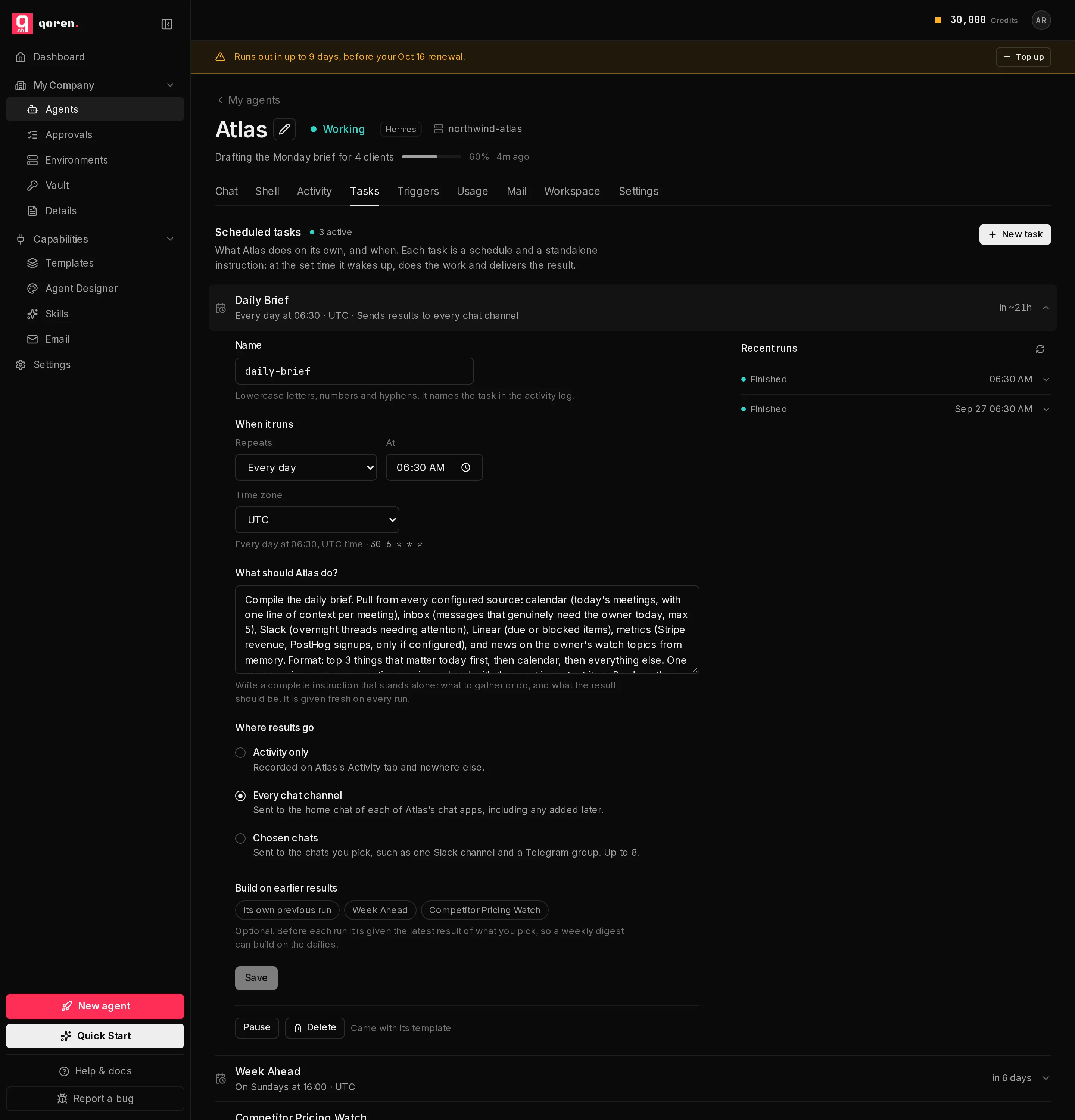
Every agent has a Tasks tab that lists what it does on its own.
- Open the agent and click Tasks (1) in the tabs under its name. Each task (3) shows its name, how often it runs, its time zone, where its results go, and when it runs next. A task with a problem also shows its state, such as Failing, and a task you paused says Paused.
- Click a task to open it. Its settings are on the left and its Recent runs (6) on the right. Click a run to read what the agent said, what went wrong if anything, how long it took, and where the result was sent.
- Change the name, the schedule, the instruction or where results go, then click Save.
- Pause (4) keeps the task without running it, and Resume turns it back on. Delete (5) asks Delete for good? Click again to remove the task.
 123456
Add a task#
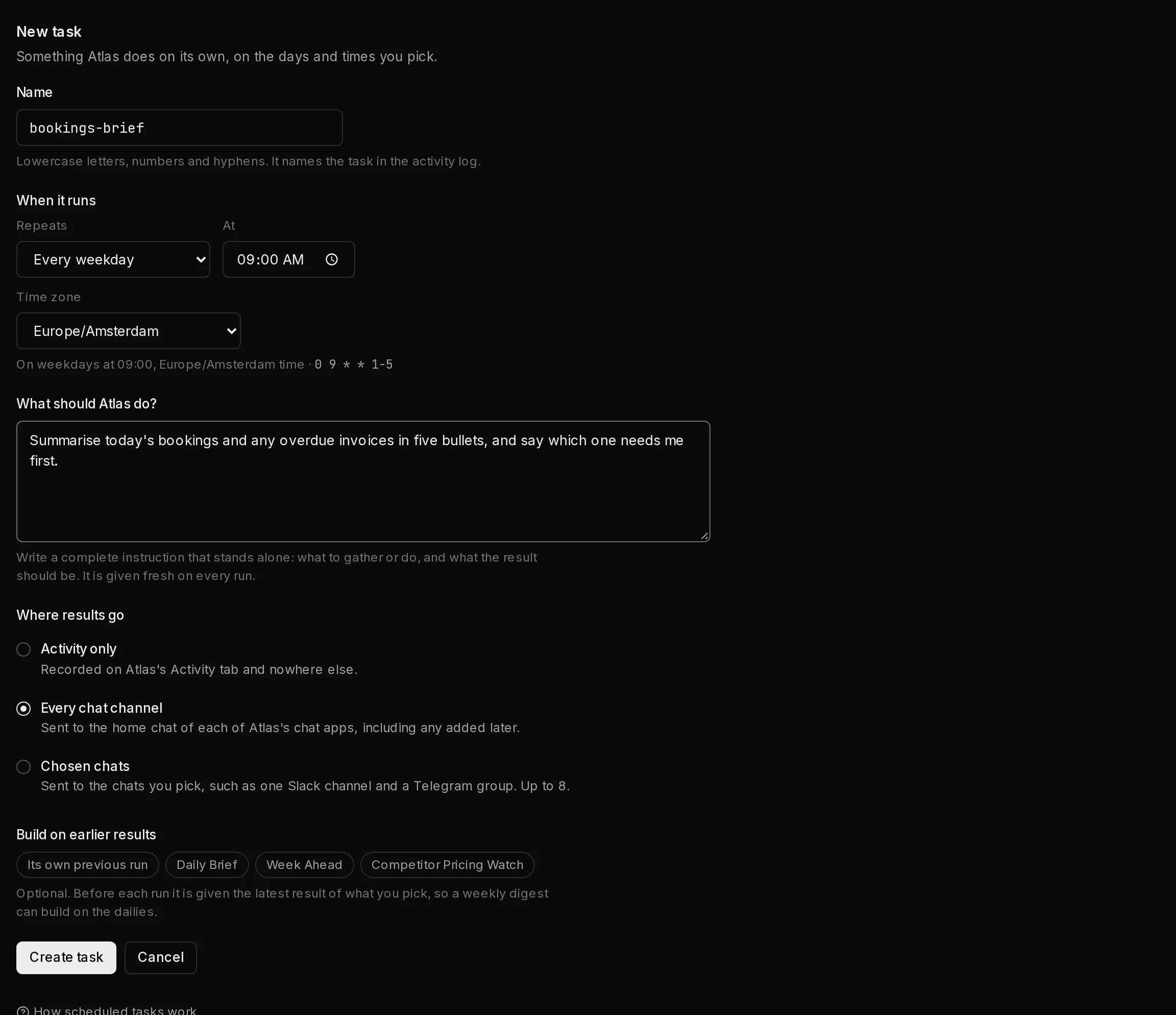
- On the Tasks tab, click New task (2 in the screenshot above).
- In Name (1), type a short name. The form keeps it to lowercase letters, numbers and hyphens.
- Under When it runs, pick how often in Repeats (2): Every day, Every weekday, Every week, Every month, Every hour, Every few minutes or Custom (cron). Set the day and time that go with it, and the Time zone (3), which starts on your browser's. The line underneath says the schedule back in words, next to the cron expression the form wrote for you.
- In What should … do? (4), which names your agent, write the instruction.
- Under Where results go (5), choose where each run's result is sent. See where results go.
- If the agent has other tasks, Build on earlier results lets this one read their latest result before it runs, or Its own previous run, so a weekly digest can build on the dailies. It is optional.
- Click Create task (6). The new task says Being installed until Qoren has put it on the agent.
 123456
See what is coming up#
- Open the agent and click the Activity tab.
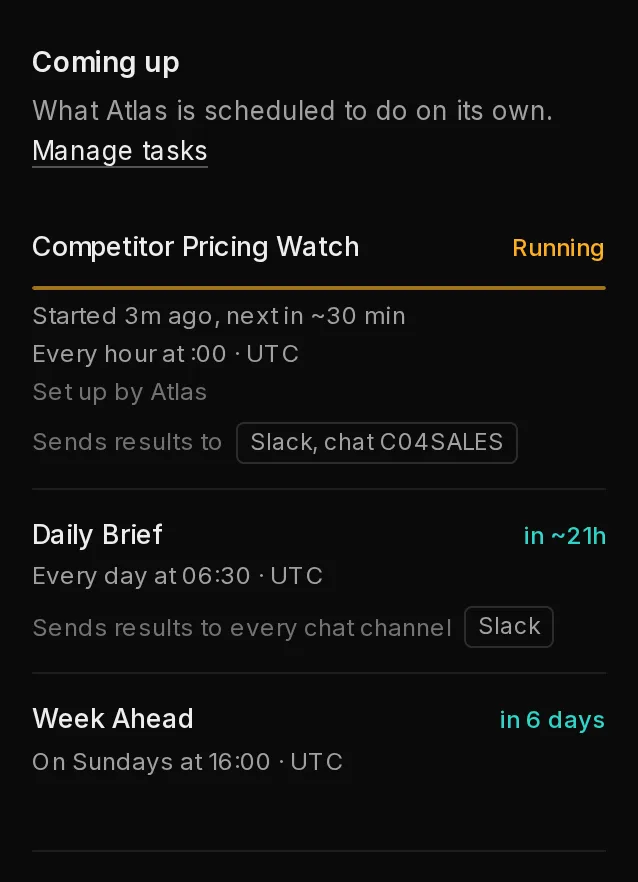
- The Coming up section (1) lists what the agent is scheduled to do on its own, soonest first: each task's name, how often it runs, its time zone, and when it runs next.
 1
1Click Manage tasks to jump to the Tasks tab. Under a task you may also see where its results go ("Sends results to every chat channel", or the chats it sends to), which other tasks' output it reads first, and its health when something is wrong:
| Health | What it means |
|---|---|
| Being installed | Just created or changed; Qoren is putting it on the agent. |
| Missed a run | It did not run when it was due. |
| Failing | Its recent runs ended in an error. |
| Delivery failing | It ran, but the result could not be delivered. |
| Install failing | Qoren could not put it on the agent. |
| No recent report | Qoren has not heard from it for a while. |
| Outcome unclear | It ran, but the result could not be confirmed. |
| Runs in the agent | Scheduled by the agent's own runtime rather than by Qoren. |
A healthy task shows no health line. The Tasks tab shows the same states beside each task. If Coming up says "No Qoren-managed tasks are scheduled", the agent either has no tasks or they run on its runtime's own scheduler.
Below it, Last 24 hours lists what the agent actually did, including each scheduled run, which you can open for its full record. The full log has every line the agent recorded. See agent activity.
Where results go#
Each task delivers its result one of three ways:
- Activity only: recorded on the agent, nowhere else.
- Every chat channel: sent to the home chat of each of the agent's chat channels. Hermes agents only.
- Chosen chats: sent to the chats you pick, up to 8 across the agent's chat apps, such as the #briefs channel on Slack and a group on Telegram. Each must be on one of the agent's own chat apps.
Every task has its own destination, so one agent can send its morning brief to a Slack channel and its noon research to a Telegram group. The console offers only the choices your agent can use: with no chat app connected, Activity only is the one choice.
An app's home chat is the one set when it was connected (the Telegram user id, or the Slack Home channel), or, on a Hermes agent, the chat where someone ran its sethome command.
Route each task from Settings#
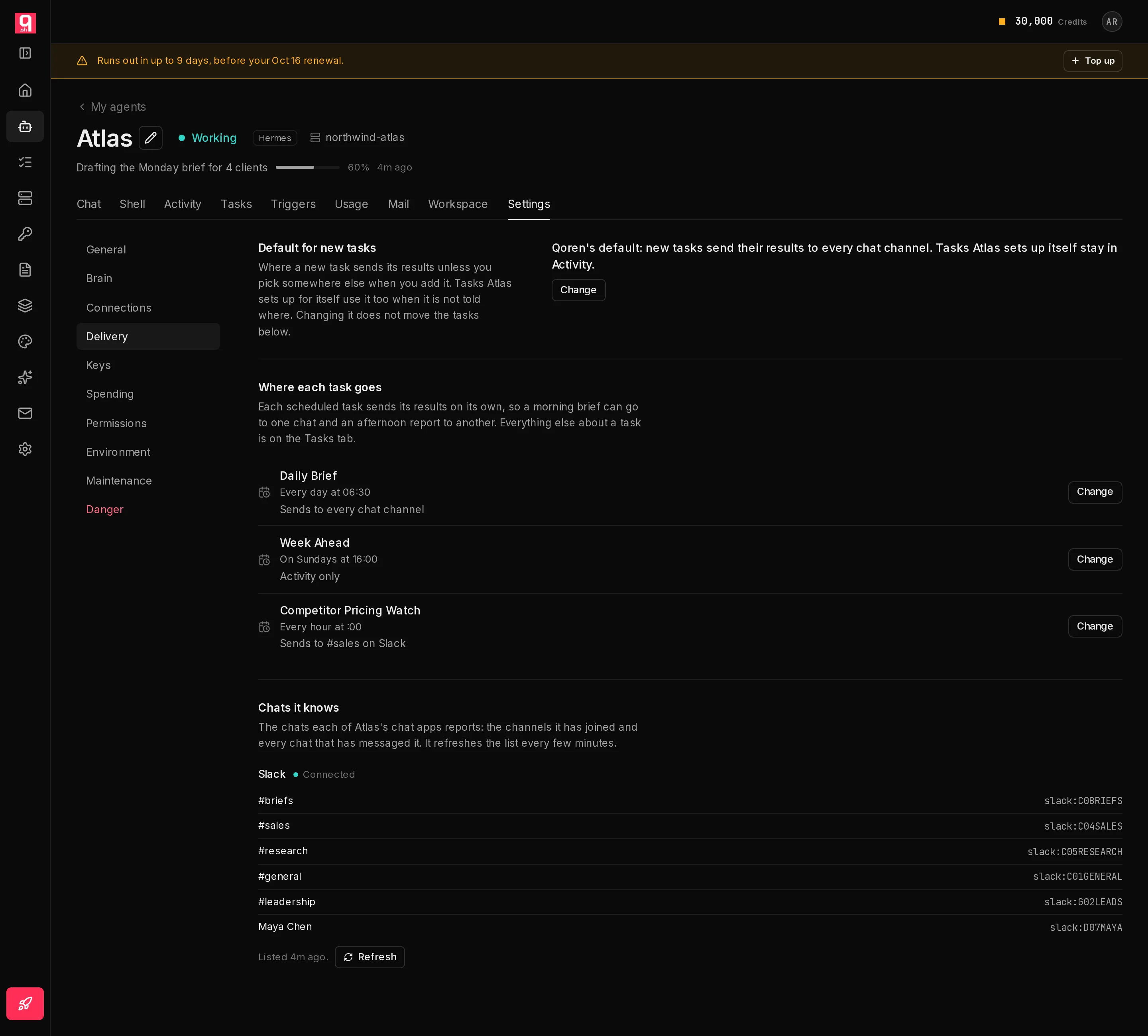
- Open the agent, click Settings, then Delivery (1).
- Under Where each task goes, each scheduled task says where it sends its results. Click Change (3) next to the one you want to move.
 1234
1234- Pick Chosen chats (1). Each chat app lists its chats by name: its home chat, the channels the agent has joined and the chats that have messaged it.
- Click a chat (2) to tick it, and click it again to untick it. The line under the chats says where each result will go.
- For a chat that is not listed yet, click Chat by id (3), type its id, such as
C0123ABCDfor a Slack channel, and click Add. - Click Save (4). Qoren updates the agent within a few minutes, and every run after that goes to the new chats.
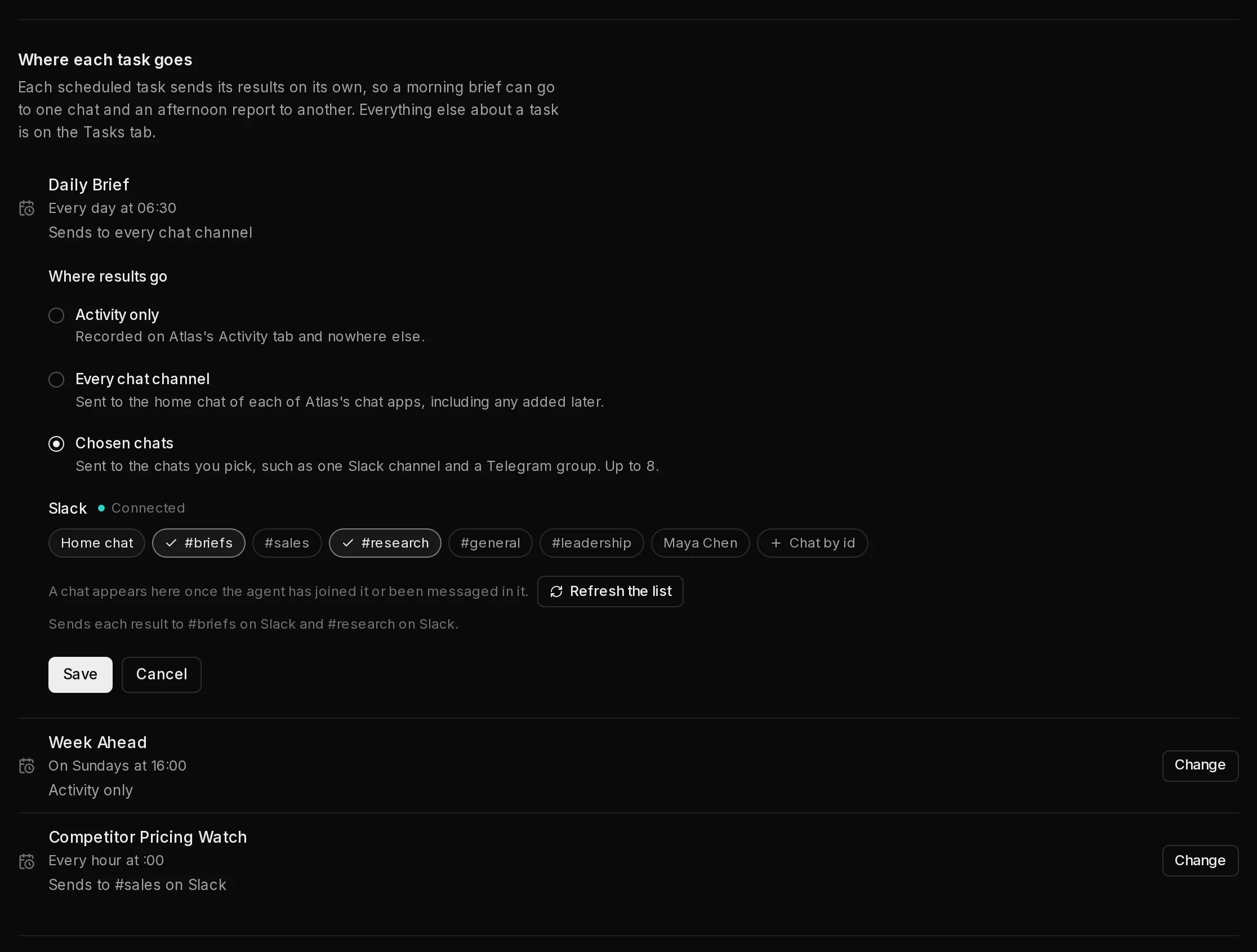 1234
1234The same picker is under Where results go when you add or change a task on the Tasks tab.
Set a default for new tasks#
On the Delivery section, Default for new tasks (2 in the first screenshot) is where a new task sends its results unless you pick somewhere else. The New task form starts on it, and a task the agent sets up itself in chat uses it when it is not told where. Click Change, pick a destination and click Save default. Use Qoren's default goes back. Changing the default does not move tasks that already exist.
Without a default of your own, a new task on a Hermes agent with chat apps goes to every chat channel, and on any other agent it stays in Activity. A task the agent sets up itself stays in Activity unless it is told where. If you remove the chat app a default sends to, Qoren's default applies until you pick again.
See which chats the agent knows#
Chats it knows (4 in the first screenshot) lists each chat app's chats with their ids, and whether the app is Connected. A chat shows up once the agent has joined it or been messaged in it, and the agent refreshes the list every few minutes; click Refresh to read it again. Only Hermes agents keep this list. For an OpenClaw agent, send to an app's home chat or add a chat by its id.
Manage tasks from the terminal#
qoren agent tasks agt_abc
qoren agent task-add agt_abc weekday-brief "0 8 * * 1-5" \
  "Summarise today's bookings and overdue invoices in five bullets." \
  --timezone Europe/Lisbon --deliver-to slack:C0123ABCD,telegram
qoren agent task-runs agt_abc tsk_123
qoren agent task-rm agt_abc tsk_123--timezonetakes an IANA time zone name; the default is UTC.--deliveryisactivity-only,all-channelsorchat;--deliver-tonames the chats, up to 8, comma separated or with the flag repeated: a bare app name such astelegramfor that app's home chat,telegram:<chat id>orslack:<channel id>.qoren agent chatslists the chats the agent knows with each one's target, ready to paste.qoren agent deliveryshows the default for new tasks,--tosets it to chosen chats,--setto another destination, and--cleargoes back to Qoren's.--context-fromlets a task read the latest output of up to five other tasks, or its own previous run (self), before it starts, so a weekly digest can build on the dailies.task-setreplaces a task;--disablekeeps it without firing it and--enableresumes it.
See the CLI reference for every flag.
What else wakes an agent#
Schedules are one way in. An agent also works when:
- You chat with it in the console.
- Someone messages it on Telegram, Slack or Discord. See chat channels.
- Another service sends an event, such as a booking, a pull request or a payment. See let an event wake your agent.
- Mail arrives in its own inbox. See give an agent its own email inbox.
Every session is tagged with where it came from, such as the console, a chat app or a schedule, so a scheduled run never looks like a chat you forgot about. What each one cost shows in usage reports.
Jobs: how changes are applied#
Changes to the machinery, such as creating an environment, setting up an agent or saving its chat channels, run as jobs in the background with live progress. That is what you see when a panel says Applying your changes…: you can leave the page and it keeps going. Each trigger delivery also runs as a job, and its id shows in the delivery log.
From the terminal, qoren jobs ls lists recent jobs, qoren jobs get <id> shows one with its steps, qoren jobs watch <id> follows a running one and qoren jobs cancel <id> asks it to stop.
Frequently asked questions#
Can different tasks go to different chat apps?
Yes. Each task has its own destination. In the agent's Settings, open Delivery and change each task under Where each task goes: the morning brief to a Slack channel and the noon research to a Telegram group, for example. One task can also send to several chats at once, up to 8.
What time zone do schedules use?
UTC, unless the task names another time zone. Tasks from a template are written in UTC. A task you add on the Tasks tab starts in your browser's time zone, and you can pick any other. Tasks created from the CLI or by the agent can name an IANA time zone such as Europe/Lisbon.
What should a task prompt look like?
A complete instruction that stands alone: what to gather or do, what the result should be, and where it goes. The agent gets the prompt fresh on every run.
How do I change the schedule of an agent that is already running?
Open the agent's Tasks tab, click the task, change when it runs and click Save. You can also ask the agent in chat, or use qoren agent task-set from the CLI. Editing the template later does not change agents already created from it.
Where do I see why a run failed?
Open the agent's Tasks tab and click the task: Recent runs lists each run, and a run opens into what the agent said and what went wrong. The Activity tab has the same runs under Last 24 hours, and The full log has the detail. From the terminal, qoren agent task-runs shows each run's output and error.