
Environment sizes and agent capacity
Qoren environments come in four sizes by how many agents they hold, 1, 2, 5 or 10. See the hourly rates, your plan's limits, and how to choose a size.
On this page
You pick an environment's size by one question: how many agents should live on it? There are four sizes, and a bigger one holds more agents and draws more credits per hour. If you are new to environments, start with what an environment is.
The four sizes#
| Size | Also called | Console description |
|---|---|---|
| 1 agent | Light | Small workload |
| 2 agents | Standard | Everyday automation |
| 5 agents | Heavy | Busy workflows |
| 10 agents | Max | Largest self-serve environment |
The console names a size by its capacity and shows the older name next to it, for example Fits 2 agents (Standard). The Qoren CLI still uses the older names.
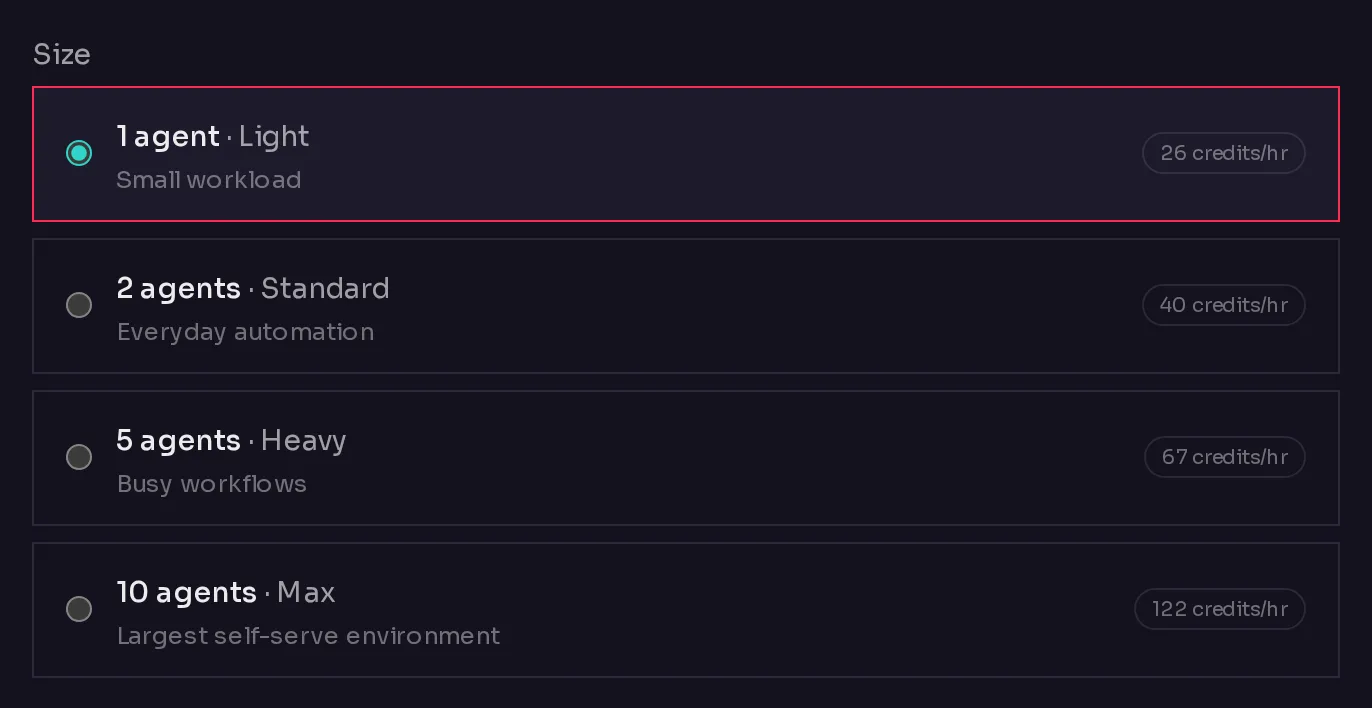 12
12Each choice shows what the size is for (1) and its hourly credit rate (2). The agents on one environment share its memory and processing power, so a size holds up to its number of agents and no more.
What each size costs#
Environments bill per running hour, in credits, from their first hour. These are the current rates:
| Environment size | Credits per hour | About per month, always on |
|---|---|---|
| 1 agent | 26 | ~$19 |
| 2 agents | 40 | ~$30 |
| 5 agents | 67 | ~$50 |
| 10 agents | 122 | ~$91 |
| Other usage | Rate |
|---|---|
| Managed model usage | Model cost plus 10% |
| Web search | 25 credits per search |
| Agent email inbox | 8,000 to 10,000 credits a month, depending on your plan |
1,000 credits are worth $1. These rates are live from the same rate card the pricing page uses.
The same rate appears on every environment card on the Environments page and in the Cost row of an environment's Overview tab. For how the credit balance works, see how credits work.
Your plan's limits#
Your plan sets two limits: the largest size you can create, and how many environments you can have at once.
| Plan | Included | Grows to | Credits each month | Your own model key | API and CLI |
|---|---|---|---|---|---|
| Starter | 1 agent, hosted all month | Grow to 3 agents, hosted by the hour | 20,000 | Yes | No |
| Pro | 2 agents, hosted all month | Grow to 25 agents, hosted by the hour | 50,000 | Yes | No |
| Ultimate | 5 agents, hosted all month | Grow to 50 agents, hosted by the hour | 80,000 | Yes | Yes |
| Business | 10 agents, hosted all month | Unlimited agents, hosted by the hour | 150,000 | Yes | Yes |
Current prices, annual billing and any launch discount are on the Qoren pricing page.
Here is what you see when you reach a limit:
- A size above your plan shows Upgrade to unlock instead of its rate, and you cannot select it. When you resize, the same size is marked needs a plan upgrade.
- The most environments your plan allows: the New environment button disappears and the Environments page says "Your plan allows up to" that many environments, with a link to upgrade your plan. Remove one to make room, or upgrade.
Compare plans on the plans and trial page.
Templates with a minimum size#
Some templates need a bigger environment to run well. When a template recommends a size, Qoren shows a tip and still lets you deploy on a smaller environment. When a template requires a size, a smaller environment is not offered: the create an agent flow says the template needs a bigger environment and asks you to resize one or add a bigger one.
How to choose#
- Count the agents you plan to run together. Pick the smallest size that fits them, with room for the next one you expect to add.
- Remember you can grow but not shrink. You can resize an environment to a bigger size later, but never to a smaller one. Starting small costs nothing extra if you grow later.
- Keep agents that work together on one environment. Collaboration between agents works inside an environment, so a team of agents belongs on the same one.
- Split by client if you run an agency. One environment per client keeps each client's agents and costs apart. See agency clients.
Frequently asked questions#
What happens if I try to add an agent to a full environment?
Qoren refuses it and says the environment is full. Resize the environment to a bigger size, or put the agent on another environment.
Can I make an environment smaller?
No. An environment's storage cannot shrink. To use a smaller size, create a new, smaller environment, move your agents to it, then remove the old one.
Is a 10-agent environment cheaper than five 2-agent environments?
Compare the hourly rates in the table above. Every environment bills by its own size, so the rate card is the whole calculation.