
Capture leads from your website forms
Send your website forms, form tools, Zapier or Make into your Qoren leads. Create a form, paste one URL or script, and keep spam in a folder of its own.
On this page
A lead form connects a form you already have, on your website or in a form tool, to your leads in Qoren. Each submission becomes an inbound lead, your team gets an email, and the lead waits on Today until someone replies. If you have no form of your own, Qoren can host a simple one for you.
Who can set up forms#
Forms follow the leads permissions the account owner gives each team member on the Settings, Team tab:
- View shows the Forms tab, each form's settings and its submissions, read only.
- Add lets them create a form.
- Edit lets them change a form's settings, get a new endpoint URL, map its fields, build its hosted page and take a submission out of Spam.
- Delete lets them delete a form.
Create a form#
- In the sidebar, open My Company and click Leads.
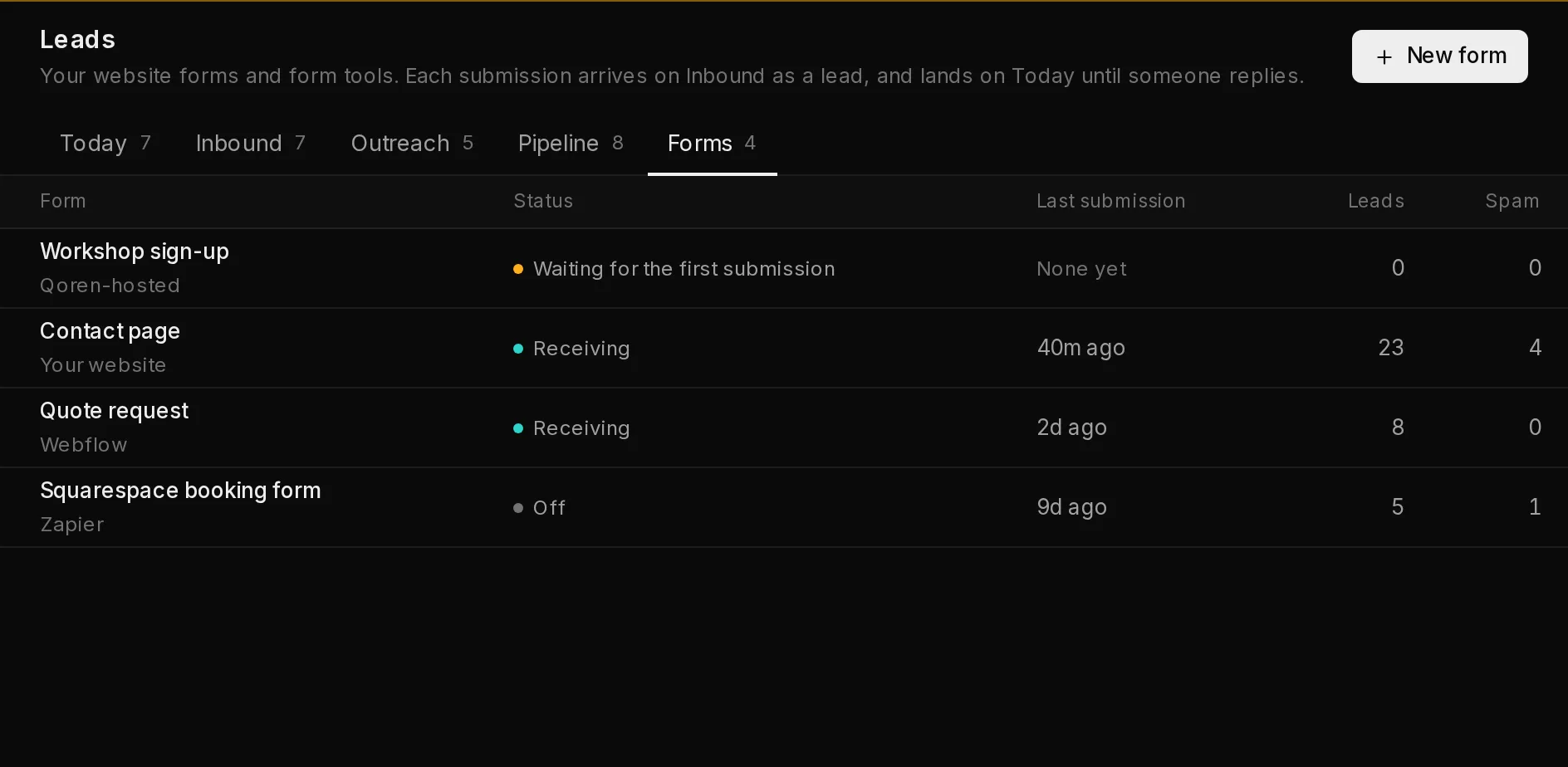
- Click the Forms tab, then New form (1). The tab lists your forms, each with where it is, its status (2), when its last submission came in, and how many leads and how much spam it has brought.
 12
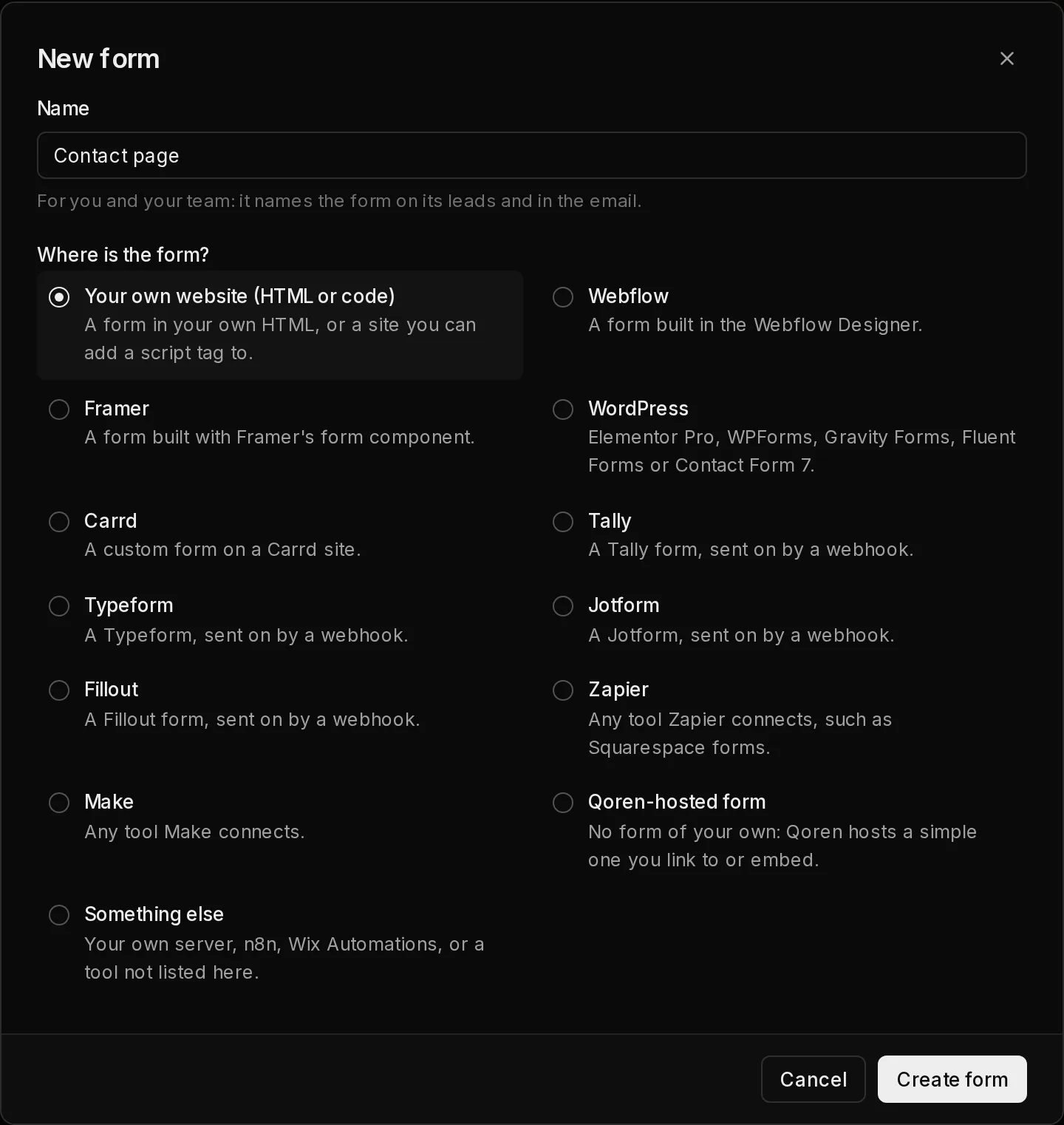
12- Type a Name (1) that tells your team which form it is, such as Contact page. It names the form on its leads and in the email.
- Under Where is the form? (2), choose where the form lives: Your own website (HTML or code), a site builder such as Webflow, Framer, WordPress or Carrd, a form tool such as Tally, Typeform, Jotform or Fillout, Zapier or Make, a Qoren-hosted form, or Something else.
- Click Create form (3).
 123
123The form opens on its Install tab, with the steps for the place you chose. A Qoren-hosted form opens on its Hosted page tab instead.
Install the form#
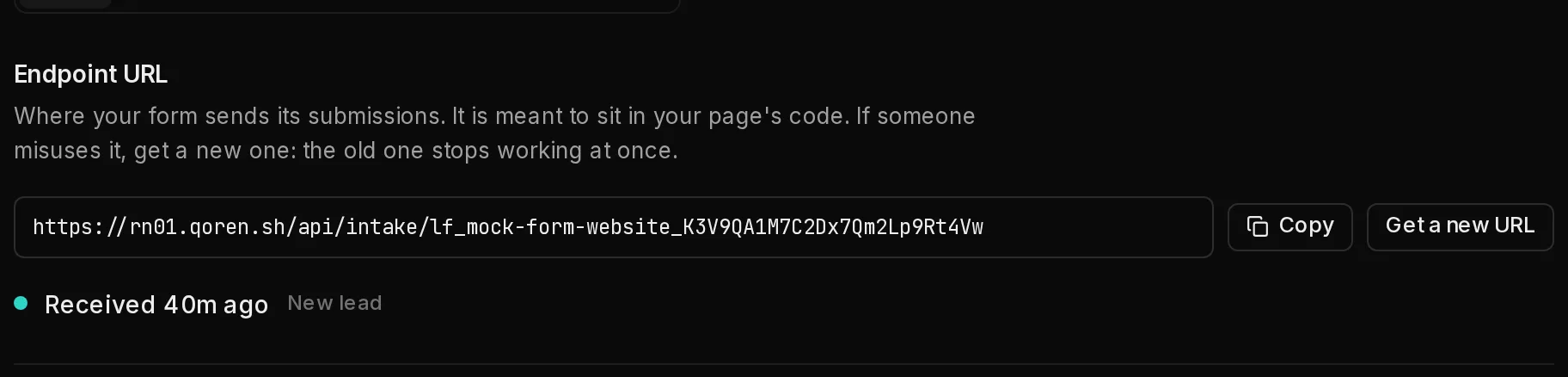
Every form has its own Endpoint URL (1): the address its submissions are sent to. Copy copies it. The URL is meant to sit in your page's code, so it is not a secret, but if someone misuses it, click Get a new URL (2). The old URL stops working at once, so update every page and tool that uses it.
Under the URL, a line (3) says Waiting for the first submission… until something arrives, then when the last submission was received. Send your form once yourself and watch it change.
 123
123There are three ways to send a form to the endpoint, each with code to copy on the Install tab:
- Add the script to your page. Give your form the id
lead-formand paste the script just above</body>. It sends the form to Qoren, adds a spam trap, and shows the reply under the form. - Or post a plain HTML form. No script needed: set the form's
actionto the endpoint URL withmethod="POST". After a send, the visitor lands on your Redirect URL, or on a Qoren thank-you page when you set none. Keep the hidden_gotchafield from the example: it is a spam trap. - Or send JSON. From your own code or a server, post the fields as JSON. The reply has
okand amessageyou can show the visitor.
Name your fields name (or first_name and last_name), email, phone, company and message where you can. Common variants are recognized, and every other field is kept on the lead as an answer. A submission needs an email address or a phone number: without either it is refused with "Please enter an email address or phone number."
Connect a form tool#
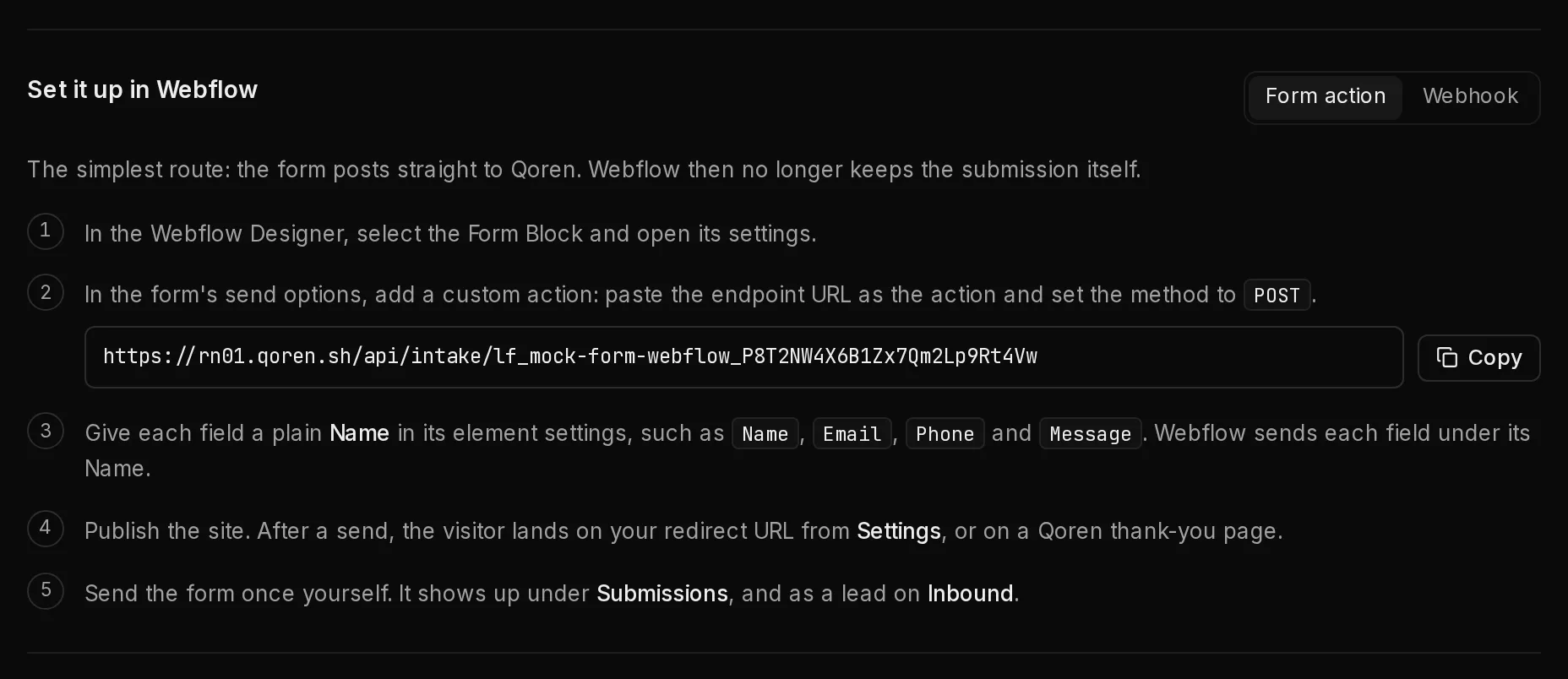
When the form lives in a site builder or a form tool, the Install tab shows the steps for that tool. For WordPress, Webflow and Something else, pick the plugin or route you use first (1).
 1
1In short, you give the tool the endpoint URL as the address it sends each submission to:
- Webflow: as the form's custom action, or as a webhook for form submissions. A webhook covers every form on the site, and Submissions shows which Webflow form each one came from.
- Framer, Tally, Typeform, Jotform and Fillout: as the form's webhook. Typeform webhooks need its Basic plan or higher.
- WordPress: as the webhook of Elementor Pro, WPForms (with its Webhooks addon), Gravity Forms (with its Webhooks Add-On) or Fluent Forms Pro. Contact Form 7 needs the free CF7 to Webhook plugin.
- Carrd: as a custom form's Send to URL, in the JSON or Default format. Custom forms need Carrd Pro Plus or higher.
- Wix: from a Wix automation's Send HTTP request action. Choose Something else, then Wix.
- Squarespace cannot send a form anywhere by itself: set the Form block's storage to Zapier, then follow the Zapier steps.
For Zapier, Make, n8n and your own server, set a Shared secret under Settings. Every submission must then carry it in the x-qoren-form-secret header, so only your automation can send to the form. Do not set one for a form on a web page: anyone can read a page's code, and the form would turn away the page's own submissions without it.
Tally, Typeform, Framer and WPForms can sign each submission with a secret you choose, and a Webflow webhook created through Webflow's API comes with one. For those tools, Settings has a Signing secret field: use the same secret on both sides (Generate makes one), and the form refuses a submission with a wrong or missing signature. Leave the field empty for anything that does not sign, or every submission is refused: webhooks added in Webflow's dashboard, and on WordPress everything but a WPForms webhook with its Request Format set to JSON.
Choose who hears about a new lead#
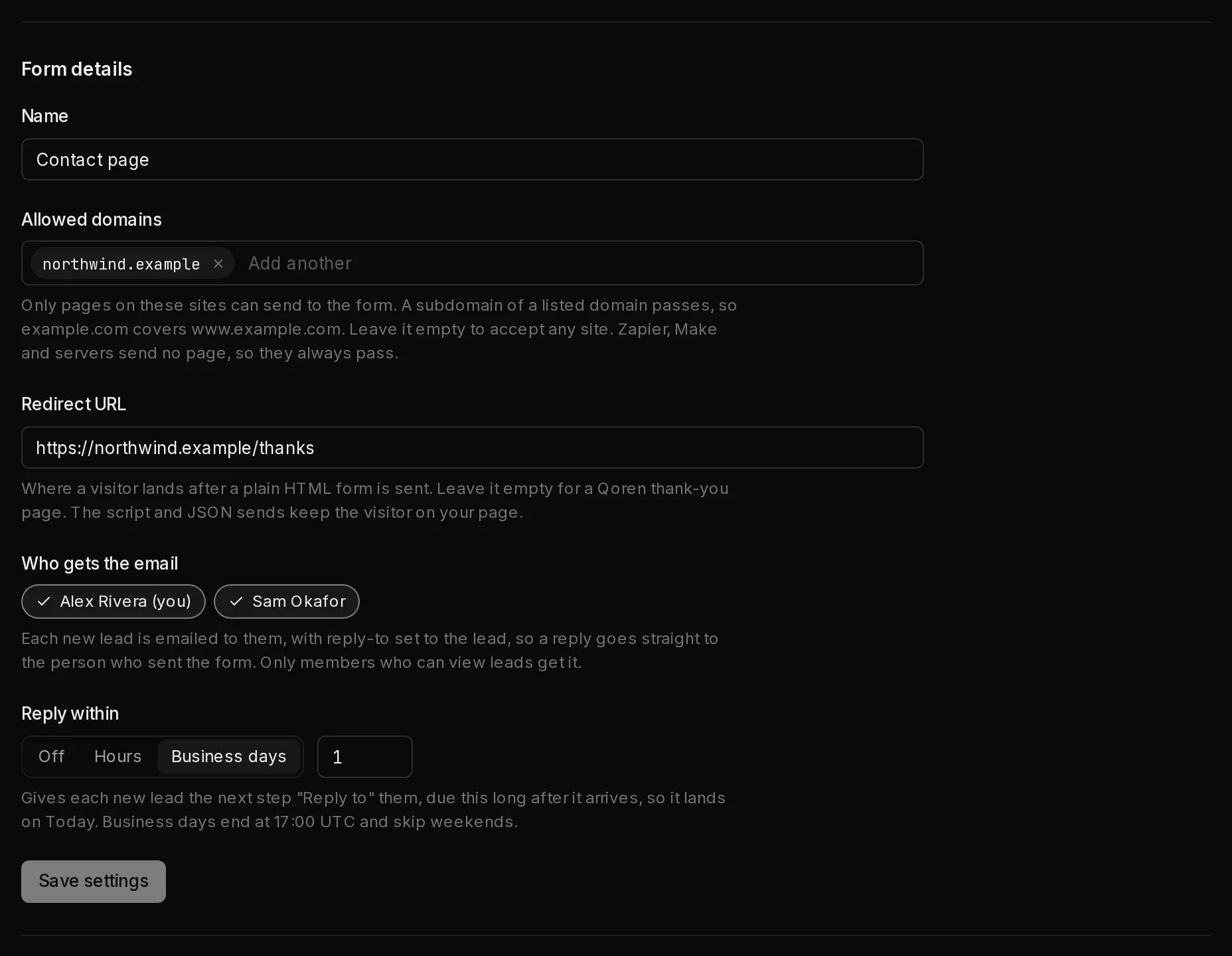
On the Settings tab, under Form details:
 123
123- Allowed domains (1): only pages on these sites can send to the form. Type a domain and press Enter. A subdomain of a listed domain passes too, so
example.comcoverswww.example.com. Leave the list empty to accept any site. Zapier, Make and servers send no page, so they always pass. - Redirect URL: where a visitor lands after a plain HTML form is sent. It must start with
https://. - Who gets the email (2): each new lead is emailed to the people you pick, with reply-to set to the lead, so a reply goes straight to the person who sent the form. Only members who can view leads get it.
- Reply within (3): Off, a number of Hours or of Business days. It gives each new lead the next step "Reply to" them, due that long after it arrives. Business days end at 17:00 UTC and skip weekends.
Click Save settings when you are done. The Accept submissions switch at the top turns the form on and off at once: while it is off, the form turns every submission away, and each attempt shows under Submissions as Rejected.
A new lead lands on the Inbound tab, with the form's name under it, and on Today as Reply to their form until someone moves it past New. Its Overview shows Their form: the form, the reply-by date, their phone, the page they came from and everything they sent. Once the reply-by date passes, Today lists it as Next step due. When the same person sends the same form again within 24 hours, Qoren updates their lead instead of adding a second one.
Map the fields#
The Fields tab lists every field seen in the form's recent submissions, with a sample of what was sent. Under On the lead, choose what each one becomes: the name, email, phone and company fill the lead's own fields, the service and the message become what they asked for, and Keep as an answer or Ignore decide the rest. Click Save fields.
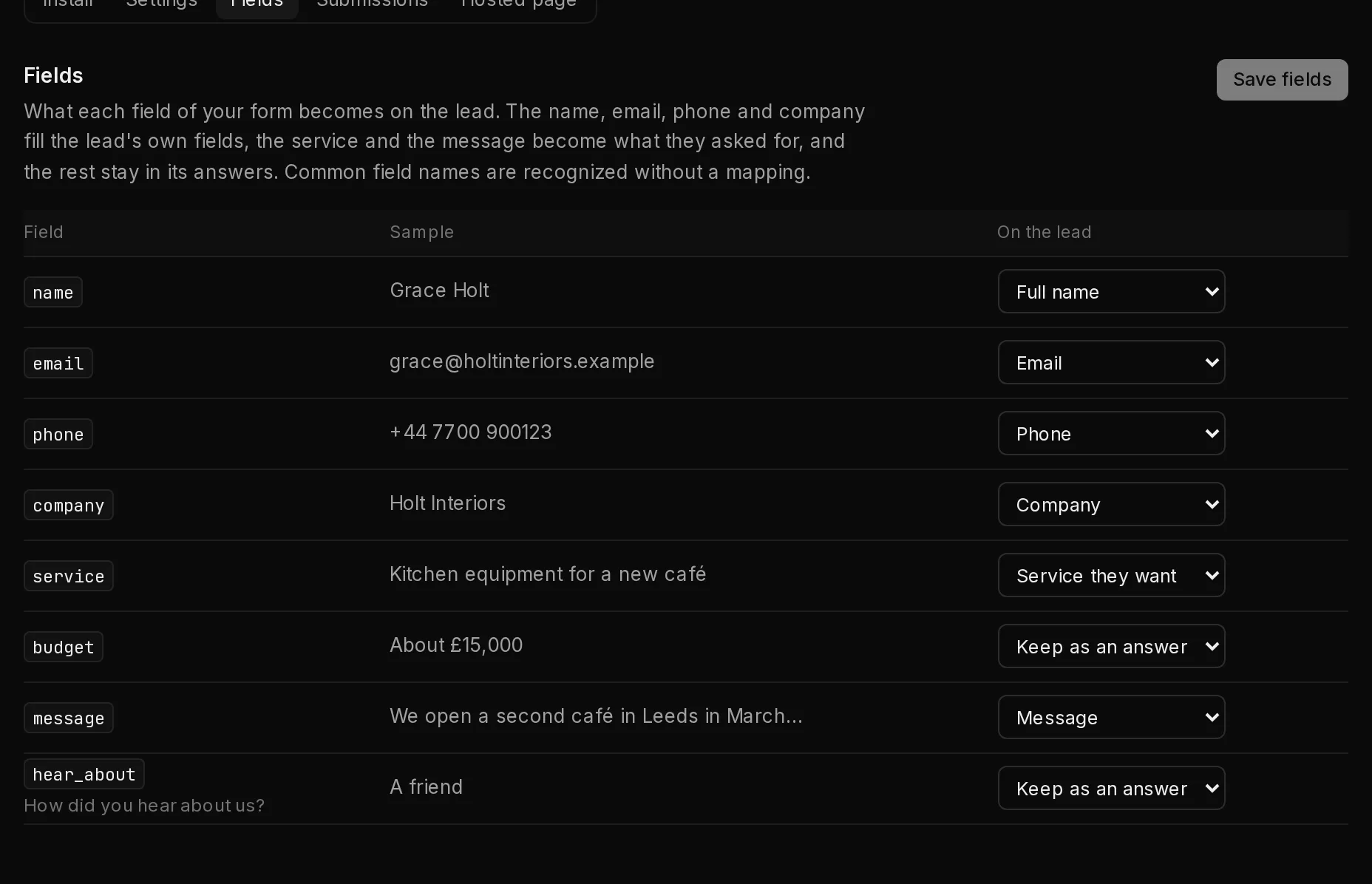
Until a submission has arrived, the tab says "Submit your form once and its fields show up here."
Keep spam out#
Every form checks each submission before it becomes a lead:
- A spam trap. The script adds a hidden field people never see, and the plain HTML example has one (
_gotcha). A submission that fills it in is spam. - Fill time. The script also notes how long the form took. One sent faster than a person could is spam.
- Throwaway addresses. A submission from a throwaway or reserved email domain is spam.
- Allowed domains. A submission from a page on another site is refused with "This form does not accept submissions from this site."
- Your own Turnstile. Under Settings, Your own Turnstile takes the site key and secret key of a Cloudflare Turnstile widget you create for your domain. The script then adds the check to your form, and the form refuses any submission without a passing one.
- Limits. A form that receives too many submissions in a short time refuses the rest for a while with "This form is receiving too many submissions. Try again later."
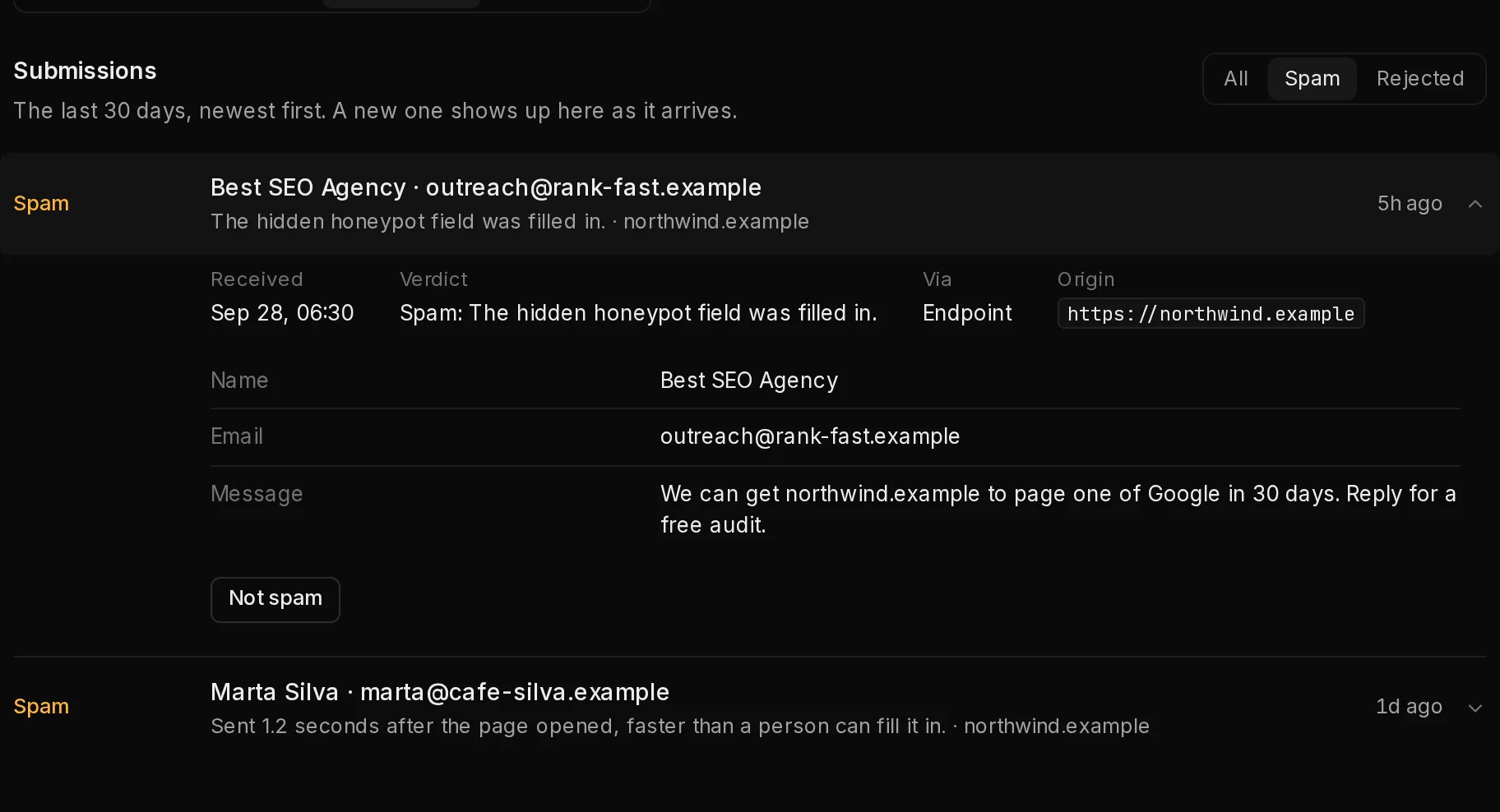
Spam is not thrown away. On the Submissions tab, the Spam filter (1) is the form's Spam folder. Open a submission to see every field, and click Not spam (2) if it was caught by mistake: it becomes a lead, and Open the lead takes you to it. Rejected lists the submissions that were turned away, with the reason, including any sent while the form was off.
 12
12Submissions are kept for 30 days. The leads they made stay until you delete them.
Use a Qoren-hosted form#
No form of your own? Qoren can host one.
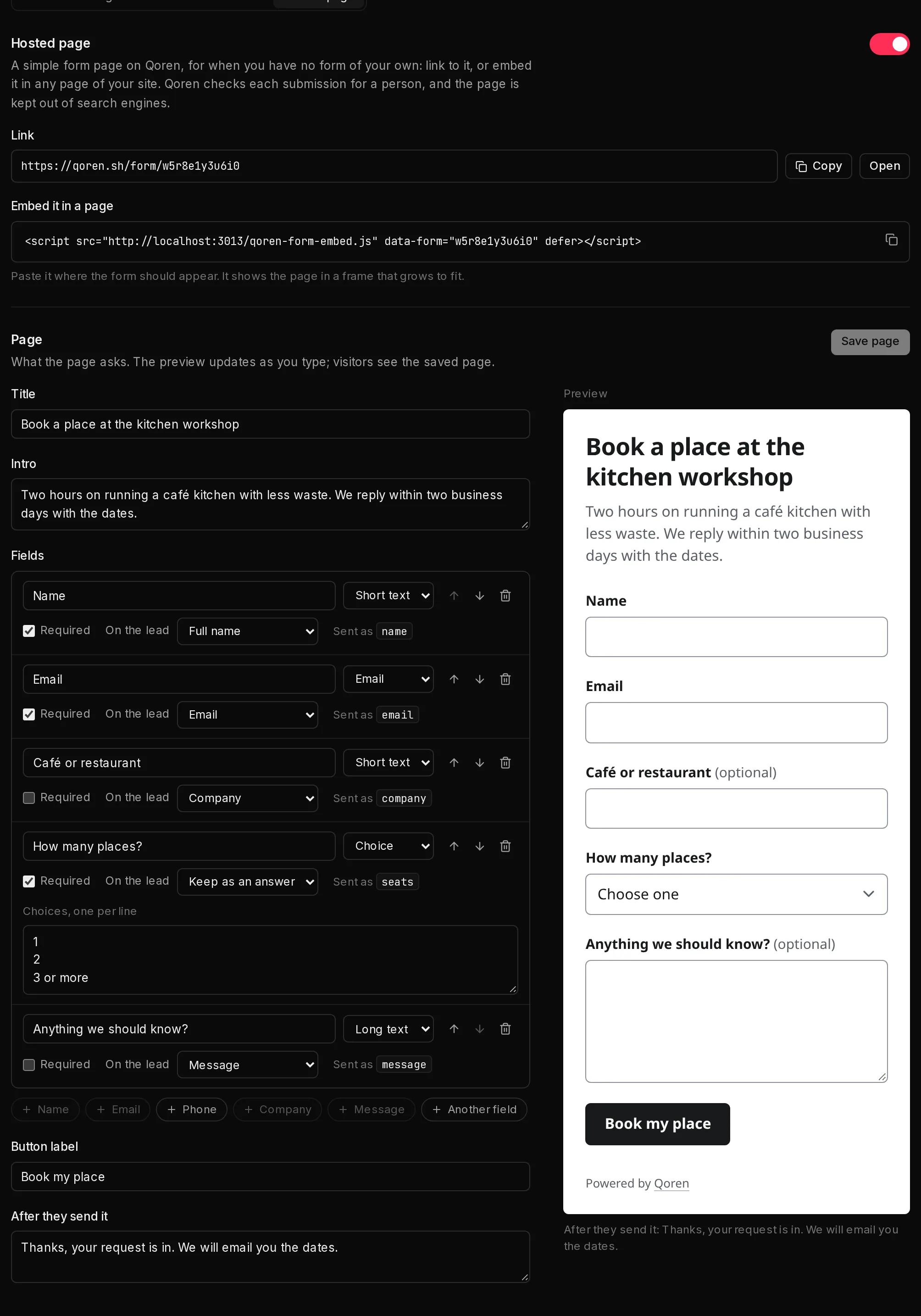
- Open the form's Hosted page tab and switch Hosted page on (1). It starts with name, email, phone and message fields.
- Under Page, set the Title, an optional Intro, the Button label and the message people see After they send it.
- Under Fields, add the ones you need with the buttons under the list (3), such as Phone or Company, or Another field for your own question. For each field, pick its type, whether it is Required, and what it becomes On the lead. Move fields with the arrows, and remove one with the bin.
- Watch the preview beside the builder, then click Save page.
- Share the Link (2), or paste the script under Embed it in a page where the form should appear on your site.
 123
123The hosted page checks each submission for a person with Qoren's own check, and it is kept out of search engines. Its link stays the same when you get a new endpoint URL. It only takes submissions while the form is on.
Turn a form off or delete it#
To stop a form for a while, switch off Accept submissions on its Settings tab. Submissions sent meanwhile are turned away and listed under Rejected. To remove it for good, click Delete form under Delete this form, then Delete form again to confirm. Its endpoint URL and hosted page stop working at once. The leads it brought in stay on your Leads.
If your account loses leads, its forms turn submissions away until leads are back.
Frequently asked questions#
Is the endpoint URL a secret?
No. It sits in your page's code, where anyone can read it. If someone misuses it, get a new URL on the Install tab. For a form fed by Zapier, Make or a server, add a shared secret so only your automation can send to it.
What happens when the same person sends the form twice?
When the same form gets the same email address or phone number again within 24 hours, Qoren updates their lead and adds the new submission to its timeline instead of adding a second lead.
Does a submission need an email address?
It needs an email address or a phone number. A submission with neither is refused, and the visitor sees "Please enter an email address or phone number."