
Choose the AI model an agent uses
Pick the AI model behind an agent, read what the model list means, see how managed and own-key usage is billed, and check its runtime and health.
On this page
The model is the AI that does the thinking for an agent: it reads each message, decides what to do and writes the reply. You pick one when you create the agent, and you can change it at any time from the agent's settings. A stronger model handles harder work; a lighter one keeps usage down.
Change the model#
- In the sidebar, click Agents and open the agent.
- Click the Settings tab. It opens on General.
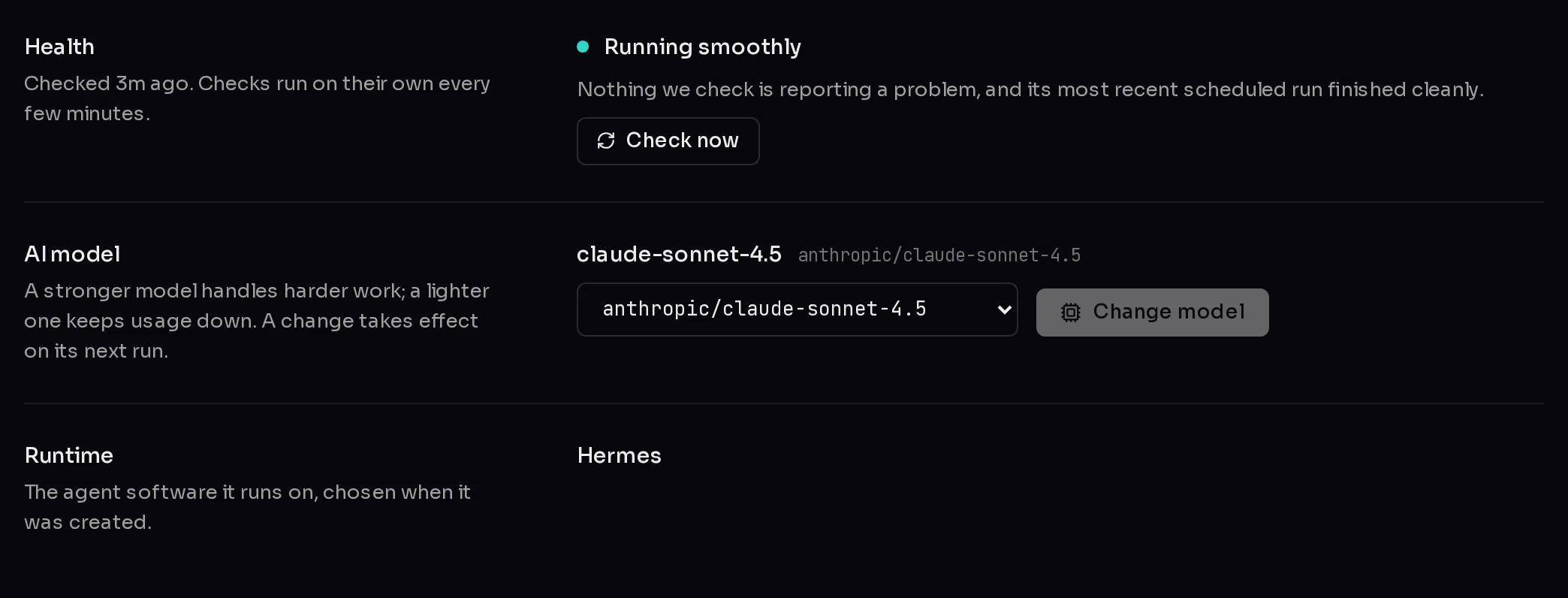
- Under AI model, open the model list (1) and pick a model.
- Click Change model (2).
 12
12While the change is applied you see "Switching *agent* to *model*…". When it finishes, the row says Saved and the agent uses the new model from its next run. To pick again, click Change again.
What the model list shows#
Each entry is a model ID in the form provider/model, such as anthropic/claude-sonnet-4-6: the part before the slash is the company that makes the model. The name in bold above the list is the short form of the model the agent uses right now, with its full ID beside it.
- Recommended and All models: when Qoren has marked some models as a good fit, the list is split into these two groups. Recommended models are a suggestion, not a limit. Every model in the list is available on every plan.
- The current model is always listed, even if it has since left the catalog, so you never lose it by opening the picker.
- The list is the same for every runtime. Hermes, OpenClaw and Codex agents choose from the same catalog.
There is no box for typing a model ID by hand here: you pick from the list.
How to choose#
- Start with a recommended model and change only if the agent struggles or costs more than you want.
- Pick a stronger model for agents that plan several steps, write long documents or work with code.
- Pick a lighter model for agents that sort, summarize or reply to routine messages all day.
- After a change, watch the agent's Usage tab for a few days to see what the switch did to its spend.
Managed key or your own key#
Every model call is paid for in one of two ways, set for your whole account rather than per agent:
- Managed key (the default). Qoren provides the model key and charges the agent's model calls in credits from your balance. See how credits work for what a call costs.
- Your own key. If you connect your own OpenRouter key under Settings, BYOK, model calls go to your key and the provider bills you directly. Qoren does not charge credits for those calls. Web search and mailboxes are still charged in credits either way. Setup is in bring your own key.
Switching between the two does not change which model an agent uses. It only changes who pays for the calls.
The Runtime row#
Runtime shows the agent software the agent runs on: Hermes, OpenClaw or Codex. It is chosen when the agent is created and cannot be changed from this page. The runtime decides some features, such as whether the agent can import skills. Runtimes compares them.
The Health row#
Health at the top of General is a one-line answer to "is this agent all right?". Checks run on their own every few minutes, and the row says when the last one ran. If the agent is running, you can click Check now to run one straight away.
| Status | What it means |
|---|---|
| Running smoothly | Nothing checked is reporting a problem. |
| Needs a look or Gone quiet | It is up, but something about its recent work needs attention. |
| Part of it has stopped or Can't be reached | It is not working right now. A repair usually brings it back. |
| Something went wrong | It did not finish setting up. |
| Still setting up | Health checks start once it is running. |
| Paused | This month's usage budget is used up. It carries on when the budget resets or you raise it. |
| Not checked yet | It is running, but its first check has not been recorded. |
When the status is red, repair the agent. When it says Paused, see spend controls.
Frequently asked questions#
Does changing the model restart the agent or lose its memory?
No. Qoren rewrites the model setting in the agent's configuration and the agent picks it up on its next run. Its identity, instructions, files and conversations stay as they are.
Can two agents use different models?
Yes. The model is set per agent. Only the choice between the managed key and your own key applies to the whole account.
Why is the model list missing?
The agent has not finished setting up yet. The picker appears once it is active, or if setup failed.
Do recommended models cost less?
Not necessarily. Recommended means Qoren suggests it as a good fit. What a model costs depends on the model itself; the agent's Usage tab shows what it actually spent.