
How Qoren keeps connected tools safe
Keys that never reach an agent, read only access, actions that always ask, read limits, approval for outside sends and an audit log. And what is not covered.
On this page
Connecting your CRM or your payment provider to an AI agent is only worth it if you can trust what happens next. Qoren puts several limits around every connected tool, and they all apply at once: if one is set loosely, the others still hold. They are checked by Qoren's servers on every call, never only in the console.
This page explains each one in plain terms, and ends with what they do not cover. For the basics of connecting a tool, see how Integrations work.
Keys never reach an agent#
- Encrypted on arrival. The key you paste, from the console or a client's connect link, is encrypted as soon as it reaches Qoren and stays encrypted at rest. It is decrypted only for the moment Qoren calls the tool for you.
- Never shown again. No page, API or tool returns the key after you connect it. The console shows only its last four characters.
- Never on the agent's machine. The key is not written to the agent's files, its environment variables or its logs. Agents use the tool only through Qoren's curated tools, and get the results, never the key.
- Signing secrets too. The secrets that prove an event really came from the tool are encrypted the same way.
Each agent gets only what you give it#
- No access by default. A new connection can be used by no agent until the owner gives one access.
- Read only or read and write. You choose a level for the connection and for each agent. A read only agent is never offered a tool that changes anything. For tools whose keys can be limited, the guide also asks you to make a key that cannot write, so the tool itself refuses too. For Pipedrive and cal.com, whose keys cannot be limited, Qoren's level is the only limit, and the console says so.
- Only the tools you pick. You can narrow an agent to a few tools with Choose tools.
- Curated tools only. There is no raw API access: each tool has a fixed shape, checks its arguments, and returns only the fields an agent needs, not whole records. There are no bulk export tools.
- Clients stay apart. On an agency account, a connection made for a client can only ever be used by that client's agents. An agent working for one client never sees another client's connection, even inside your own account. Qoren checks this on every call.
Actions that always ask#
Some actions wait for a person every time, whatever the agent's autonomy, and are never approved automatically. They are tagged Always asks in the tool list and in each tool's guide. They cover:
- anything that moves money: refunds, cancelled subscriptions, coupons;
- closing, cancelling, rescheduling, archiving or merging: a deal marked won or lost, a closed issue, a merged pull request, a cancelled order or booking;
- sending to people outside your account: emails through Resend or SendGrid, posts in a Slack channel shared with another company;
- taking an address off a suppression list.
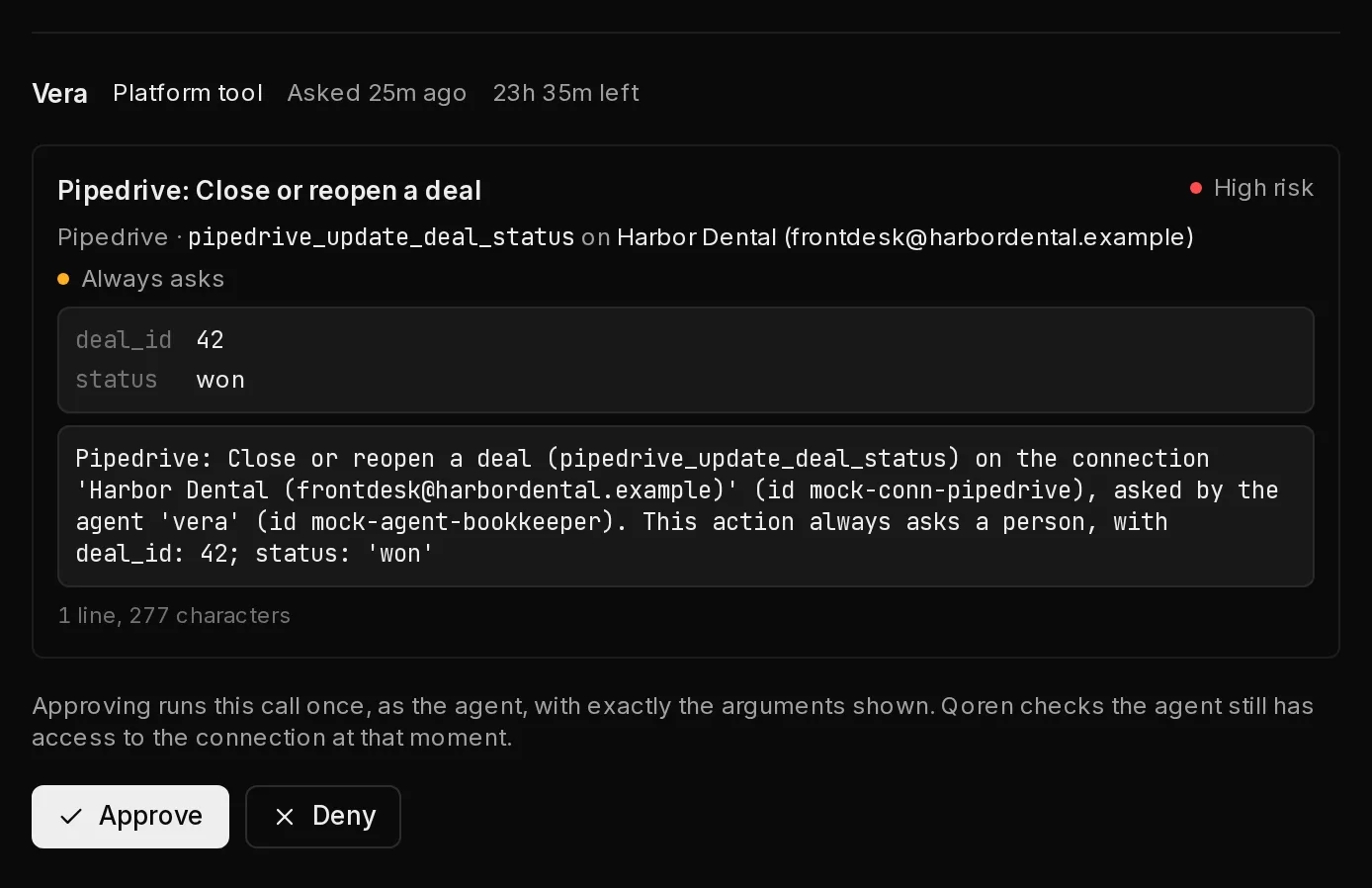
The request lands on the Approvals page with the exact arguments that will run, such as the deal and the status. Approve it and that exact call runs once, as the agent, with every check made again at that moment: if you lowered the agent's access in the meantime, it is refused. Deny it and nothing happens. A request nobody decides expires after 24 hours.
 12
12Other changes follow the agent's autonomy#
A tool that changes records but does not always ask, such as adding a note or moving a deal to another stage, follows the agent's autonomy. It waits for approval when the agent's Edit leads, clients and proposals row is set to Ask first, or, for an agent on an environment, when any of its When work comes from rows is set to Ask first. So on Balanced, where new agents start, every change to a connected tool waits for you. On Autonomous, those changes go ahead and only the actions that always ask wait.
This matters most for triggers. An event can carry text written by anyone, such as a new lead's message, and the agent reads it in a turn nobody watches. The agent is told to treat event data as information, never as instructions, but the actions that always ask are the hard limit, and the autonomy setting decides the rest.
Read caps#
Each agent may read a limited number of records from each connection in an hour: 500 to start, which you can set from 1 to 10,000 on the agent's line in the connection. Qoren counts the records each tool returns and asks the tool for no more than what is left. Once the hour's limit is used up, reading tools are refused until older reads fall out of the hour. This keeps a confused or misled agent from paging through your whole CRM.
Outbound sends after a read#
For 30 minutes after an agent reads anything from a connection, Qoren holds anything it tries to send out through Qoren for your approval:
- tools that send data to someone outside your account, such as a public GitHub comment or an email;
- a message to another agent, unless that agent also has access to every connection the first one read from.
The request waits on the Approvals page like any other. This makes it much harder for an agent misled by an event to copy your data out through Qoren's own channels.
Triggers an agent asks for#
An agent can ask to be woken by an event in a tool it has access to, but the trigger does nothing until the owner approves it, whatever the agent's autonomy. It must name a limit of events an hour, and an agent can hold at most 5 triggers of its own. See triggers an agent asks for.
Everything is logged#
Every connect, key replacement, grant change, disconnect, connect link sent or used, trigger change, and every tool call, reading or writing, is recorded in your account log: who did it (you, an agent or Qoren itself), which connection and tool, and which records. Tool calls that were refused or that waited for approval are recorded too. The log never holds keys or the text of arguments.
Events are kept for a limited time#
The body of each event a trigger received is kept for 7 days on Starter, 30 on Pro, 90 on Ultimate and 180 on Business, then removed. See how long event bodies are kept.
What this does not cover#
Be clear about one limit. An agent on a hosted environment has its own computer, with a shell and open internet access. The limits above cover what passes through Qoren: the connected tools, Qoren's own messages between agents, and its approvals. They cannot see what an agent does on its own machine.
- An agent that read connection data could still send it somewhere with its own commands or its own web access.
- An agent's own mailbox talks to its mail service directly, so the hold on outbound sends after a read does not apply to email the agent sends from it.
So treat these limits as strong guard rails, not a guarantee. Give access only to the agents that need a tool, prefer Read only, narrow the tools, keep read caps low, and keep agents that read sensitive data on Balanced or Cautious.
Frequently asked questions#
Can an agent see or change its own access?
No. Only the account owner can give, change or remove access, in the console. No tool lets an agent read or widen what it may use.
What stops a poisoned event from making the agent refund someone?
Refunds, cancellations and every other action that moves money always wait for a person, whatever the agent's autonomy, and the approval shows the exact amount and record before anything runs.
Is a read only grant safe with a key that can do everything?
Qoren never offers a read only agent a tool that changes anything, and checks the level on every call. The key's own rights are a second layer only where the tool lets you limit keys, so for Pipedrive and cal.com use a dedicated user with the least access you can.
Does Qoren keep copies of my CRM data?
Qoren keeps the bodies of trigger events for your plan's retention period and a record of each tool call without its results. Tool results go to the agent's turn; they are not stored as a copy of your records.